PROXY64 – reverse proxy
PROXY64 forwards requests for your domains to services in your home network – with certificates, access lists, overload protection and statistics. It replaces Nginx Proxy Manager and doesn't need nginx: Node64 speaks HTTP/1.1, HTTP/2 and HTTP/3 itself.
This page covers the reverse proxy in your home network with your own port forwarding. How to publish services without port forwarding via the ipv64 edge servers is explained in CDN64. Certificates have their own page: Certificates.
Overview
A reverse proxy accepts all requests on ports 80 and 443 and decides by name where each one goes. That way cloud.example.com, ha.example.com and nas.example.com all work through a single internet connection, each with a valid certificate.
 Internet        Router             Node64 (PROXY64)        Home network
                ┌─────────┐       ┌────────────────────┐
 Visitor ──────►│ 80/TCP  │──────►│ TLS ends here      │──► Nextcloud
 (IPv4/IPv6)    │ 443/TCP │       │ the name decides   │──► Home Assistant
                │ 443/UDP │       │ where it goes      │──► NAS
                └─────────┘       └────────────────────┘
 You only need 443/UDP for HTTP/3.
- With the module off, nothing runs: no routes, no checks, no cache, and the ports stay closed.
- PROXY64 runs entirely locally. You only need an ipv64.net account for CDN64, for ipv64 DNS records and for certificates via ipv64 DNS-01.
Enable and set up
- Enable the module
Under Settings → Modules → PROXY64. - Configure your router
Forward ports 80/TCP and 443/TCP to the node, plus 443/UDP for HTTP/3. Details under Ports and router. - Set up DNS
The domain must point to your internet connection, ideally as a CNAME to your DynDNS domain. See DNS. - Get a certificate
Under Certificates, accept the Let's Encrypt terms and request a certificate – or tick “Request a new certificate right away” in the host form. - Create a proxy host
Under PROXY64 → Proxy hosts, enter the domain and target, done. See Create a proxy host.
Ports and router
PROXY64 needs the standard ports so visitors don't have to put a port number in the link.
| Port | Used for | Forward on the router? |
|---|---|---|
80/TCP | HTTP, redirect to HTTPS, Let's Encrypt HTTP-01 | yes |
443/TCP | HTTPS with HTTP/1.1 and HTTP/2, TLS passthrough | yes |
443/UDP | HTTP/3 (QUIC) | yes, if you want HTTP/3 |
| any | streams (TCP/UDP) | the port you chose, per stream |
- Different port on the router: if your router forwards e.g. 443 to 8443, set the HTTPS port to 8443 and “External HTTPS port” to 443 under Settings → Ports.
- Ports in use: the port overview under Settings → Ports shows who uses which port and reports conflicts – including other programs on the host.
- Ports below 1024 work without root: the image allows the binary to open them (
cap_net_bind_service). If the container is stripped of this capability, root alone isn't enough either.
Docker: host network recommended
PROXY64 is easiest to run in the host network. The node then sees the ports directly, and streams can open any port without you having to recreate the container.
services:
  node:
    image: ghcr.io/ipv64net/node64:latest
    container_name: node64
    restart: unless-stopped
    network_mode: host        # 80, 443 and stream ports directly on the host
    volumes:
      - node64-data:/data
volumes:
  node64-data:
The UI is then available at http://<host>:8080. In bridge mode you publish the ports one by one – plus one more per stream:
    ports:
      - "8080:8080"
      - "80:80"
      - "443:443/tcp"
      - "443:443/udp"         # HTTP/3
In the bridge network PROXY64 checks whether 80 and 443 are really published on the Docker host. If a port is missing, the host list and Settings → Ports show a clear warning – with an example for docker run and Compose.
The public image ghcr.io/ipv64net/node64 is coming soon. Everything about installing: Installation and Configuration.
DNS: point the domain to your connection
For visitors to reach your node, the name has to point to the public address of your internet connection.
- Ideally as a CNAME to your DynDNS domain, e.g.
cloud.example.com→yourname.ipv64.net. When your IP changes, DynDNS64 keeps the DynDNS domain current and every CNAME follows automatically. - Domains at ipv64: if the domain is in your ipv64.net account, PROXY64 can create the record (CNAME or A/AAAA) for you when you add the host. Existing records stay untouched.
- CDN64 doesn't need a CNAME – ipv64 switches the name over itself. See CDN64 → DNS.
Straight to the proxy at home (DNS64)
If DNS64 runs on the node, the Add to local DNS64 button (house icon) in the proxy host list adds all names of the host as custom DNS records – without a zone, as A and optionally AAAA pointing to the reverse proxy. Devices at home that ask DNS64 then go straight to the proxy instead of via the internet.
- Suggestion: the address you are using to open Node64, otherwise the node's LAN address.
- Names that already have a record of the same type or a CNAME stay unchanged.
- A green house shows that all names are already added locally. Edit and delete under DNS64 → Custom DNS records.
- Web interface only, not via the API.
Host types
| Type | What happens | Good for |
|---|---|---|
| Proxy host | One or more domains (wildcards like *.example.com included) go to a target http(s)://host:port. The target can be a name, an IPv4 or an IPv6 address, e.g. [fd00::5]:8080. | almost anything: Nextcloud, Home Assistant, Jellyfin … |
| Redirect | Domains redirect to another address with code 300, 301, 302, 303, 307 or 308. Path and query can be carried over; the scheme follows the request or is fixed. | old domains, www → no www |
| 404 host | The domains deliberately answer “not found”, HTTPS included. | retired names |
| TLS passthrough | A name on 443 is passed raw (by SNI) to a service with its own certificate. Node64 doesn't decrypt. Port 80 redirects to HTTPS. Passing through to the node's own web interface is refused. | services that manage their own certificate |
| Status page | A domain shows a health check status page directly at / – see below. | public status on your own domain, e.g. status.example.com |
| Stream | A port (TCP and/or UDP) is passed raw to a target. For TCP, optionally with TLS termination using a certificate from the store. UDP sessions end after 60 seconds without packets. Optionally reachable from the internet via CDN64. | game servers, MQTT, WireGuard |
All other names on 443 stay with Node64, even if individual names are passed through. Streams can't use the ports of the shared entry point (80, 443).
Status page on your own domain
In the Status pages tab you create a host, enter the domain and choose a status page. It then appears directly at /.
- Certificate from the central store, force SSL, HSTS and HTTP/3 just like a proxy host.
- Blocklists, country block, limits, the exploit block and an access list apply in front of it. Statistics and the access log count along.
- Via CDN64 you switch the host on in mode 1 or 2 like a proxy host. Then you need no port forwarding and your IP stays hidden.
- On import on another node the host is matched to the page by its slug; if the page doesn't exist there, the host is created switched off.
- If the status page is switched off or doesn't exist, the host answers
404; if the health checks module is off,503. - Export and import keep the assignment.
Visitors reach only the status page this way, never the admin interface – the admin port stays closed. New status pages are also served on the node port at /status/<slug>; if the page should only be reachable via the domain, switch “Publish on the node port” off there.
Default page for unknown names
If someone calls the node by IP or with a name that has no host, the default page kicks in. You have four options:
- reply 404 “not found”,
- close the connection without a reply (like nginx's
444), - redirect to an address of your choice,
- your own HTML page up to 64 KB.
If the honeypot bait is switched on, it replaces the default page. The default page settings then show a note with a link; via the API GET /api/edge reports it in the unknown_replaced field.
Create a proxy host
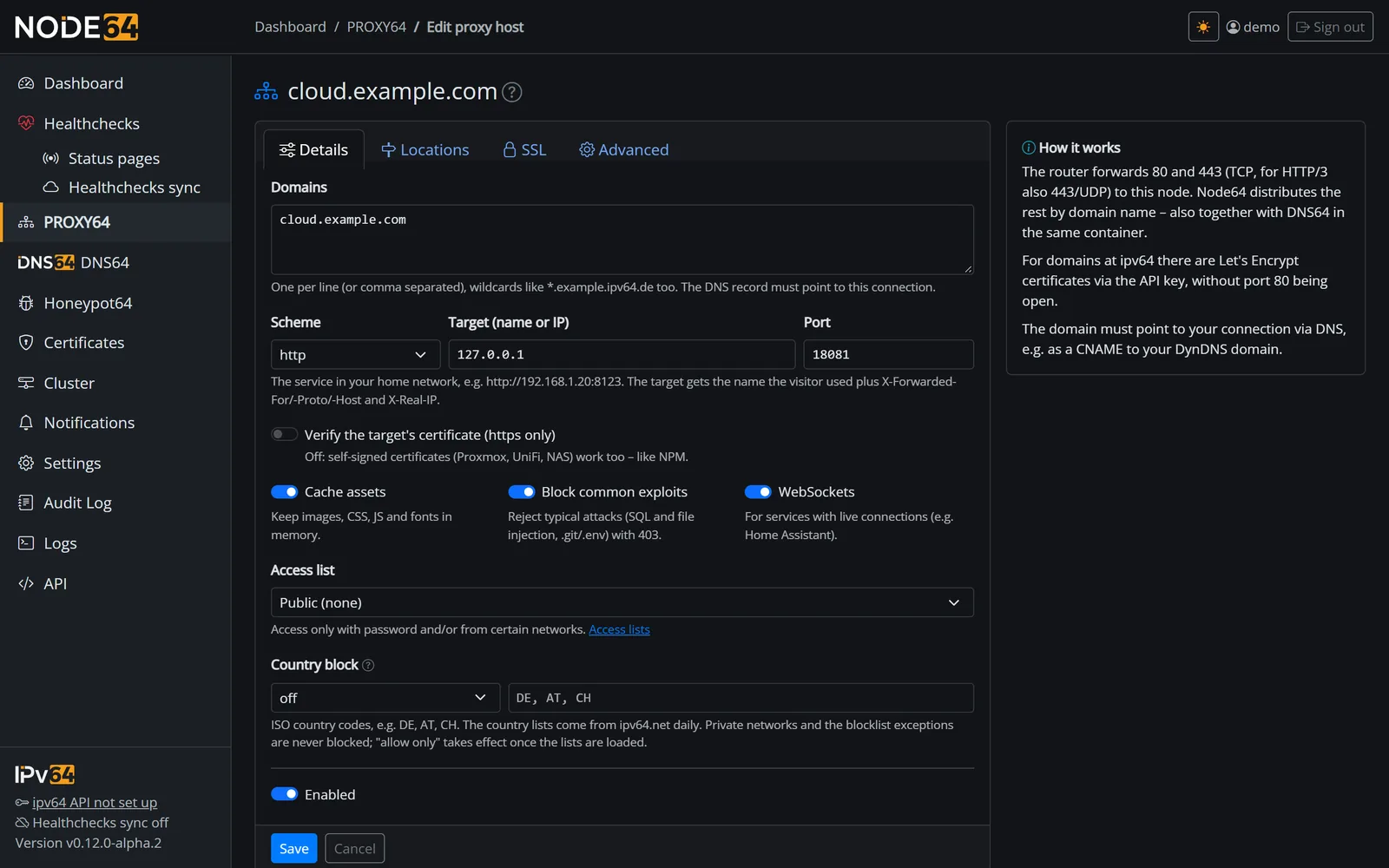
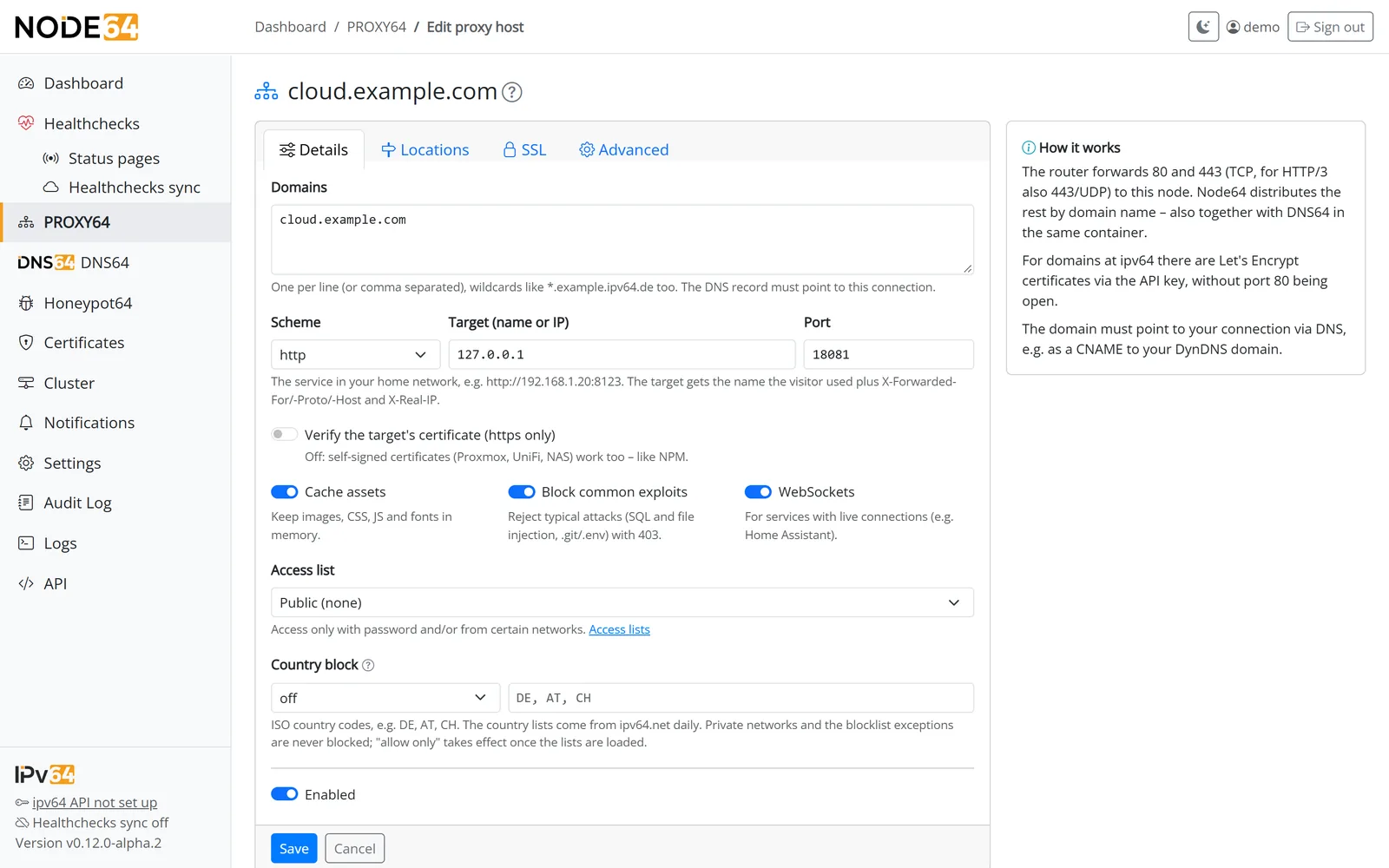
The form has four tabs: Details, Locations, SSL and Advanced.
- Details
Enter the domain(s) and pick the target (httporhttps, host, port). Optionally let it create the DNS record at ipv64. - SSL
Choose a certificate from the store (matching the name, or a fixed one), or request a new one right away. - Save
The host is live immediately. The list shows whether the target is reachable and its response time.
Options per proxy host
Basic options
| Option | What it does |
|---|---|
| WebSockets | Allows WebSocket connections to the target (e.g. for Home Assistant). |
| Block common exploits | Blocks typical attack patterns with rules like in NPM, plus requests for .git, .env and wp-config.php. Response 403. |
| Cache assets | Keeps static files (images, CSS, JS, fonts) in memory, 64 MB in total at most. Without max-age from the target, 30 minutes apply. Aborted responses never end up in the cache. |
| Verify target certificate | Like NPM, PROXY64 doesn't verify the certificate of an https target by default. Turn this on if the target has a valid certificate. |
SSL
- Certificate from the central store (matching the name or picked explicitly) – or HTTP only.
- Force HTTPS (redirect from 80 to 443).
- HSTS, optionally including subdomains.
- HTTP/2 and HTTP/3 (QUIC over 443/UDP; on by default).
- Minimum version TLS 1.2 or TLS 1.3.
Advanced
Instead of free-form nginx config there are fixed fields for what people usually put there:
- set or remove headers towards the target and towards the visitor,
- host header to the target (default: the name the visitor used),
- timeout to the target,
- upload limit (response 413 above it),
- disable buffering (for streaming and long responses),
- compress responses (zstd, Brotli, gzip),
- trusted proxies in front, with a preset for Cloudflare,
- “No per-IP limits” (see Overload protection).
What the target receives
The target gets X-Forwarded-For, X-Forwarded-Proto, X-Forwarded-Host and X-Real-IP – always with the real peer. If a visitor sends these headers themselves, PROXY64 drops them. The exception is a visitor coming through a trusted proxy you've configured; then that proxy's information about the real client IP counts. That's why X-Forwarded-For and X-Real-IP cannot be set or removed under Advanced.
Compression
The Compress responses switch under Advanced shrinks responses before they go to the visitor. It is on by default for new proxy hosts; existing hosts keep their setting. The method follows what the browser supports:
| Response | Order | Level |
|---|---|---|
| dynamic (pages, API) | zstd → Brotli → gzip | fast, fresh for every request |
| static file with Cache Assets | Brotli → zstd → gzip | strong – compressed once, then served ready from the cache |
- What is compressed: text, HTML, CSS, JSON, JavaScript, XML, SVG, WASM and fonts except woff/woff2 – from 512 bytes and only with status 200.
- What isn't: images, videos and archives, range requests,
HEAD, WebSocket, responses withCache-Control: no-transformand anything the target already compressed. - The cache keeps one copy per method. Strong ETags become weak (
W/). - This also applies via CDN64 in modes 1 and 2 – the response comes from your node; in mode 2 it also saves traffic in the tunnel.
- Via the API the field is still called
advanced.gzip.
If a page returns a secret (e.g. a CSRF token) together with attacker input in the same response, the size of the compressed response can leak something about it. For such applications, switch compression off for that host.
Custom locations
Locations send individual paths of a proxy host to a different target, e.g. /api to a separate service.
- Each location has its own target and optionally a different path on the target.
- Its own WebSocket switch and its own access list.
- The longest matching path wins. So
/api/v2takes precedence over/api.
Access lists
Access lists protect proxy hosts, locations and redirects with a password, IP rules or both.
- Users: sign-in via basic auth. Passwords are stored only as bcrypt hashes. If you like, PROXY64 passes the credentials on to the target.
- IP rules: allow or deny, for IPv4 and IPv6, networks included. The first matching rule applies. If none matches, access is denied.
- Combination: “both required” (IP matches and credentials are correct) or “any one is enough”.
- Brute-force protection: after 10 failed attempts within 5 minutes, the IP is blocked for 15 minutes. The block is recorded in the audit log.
ipv64 blocklists
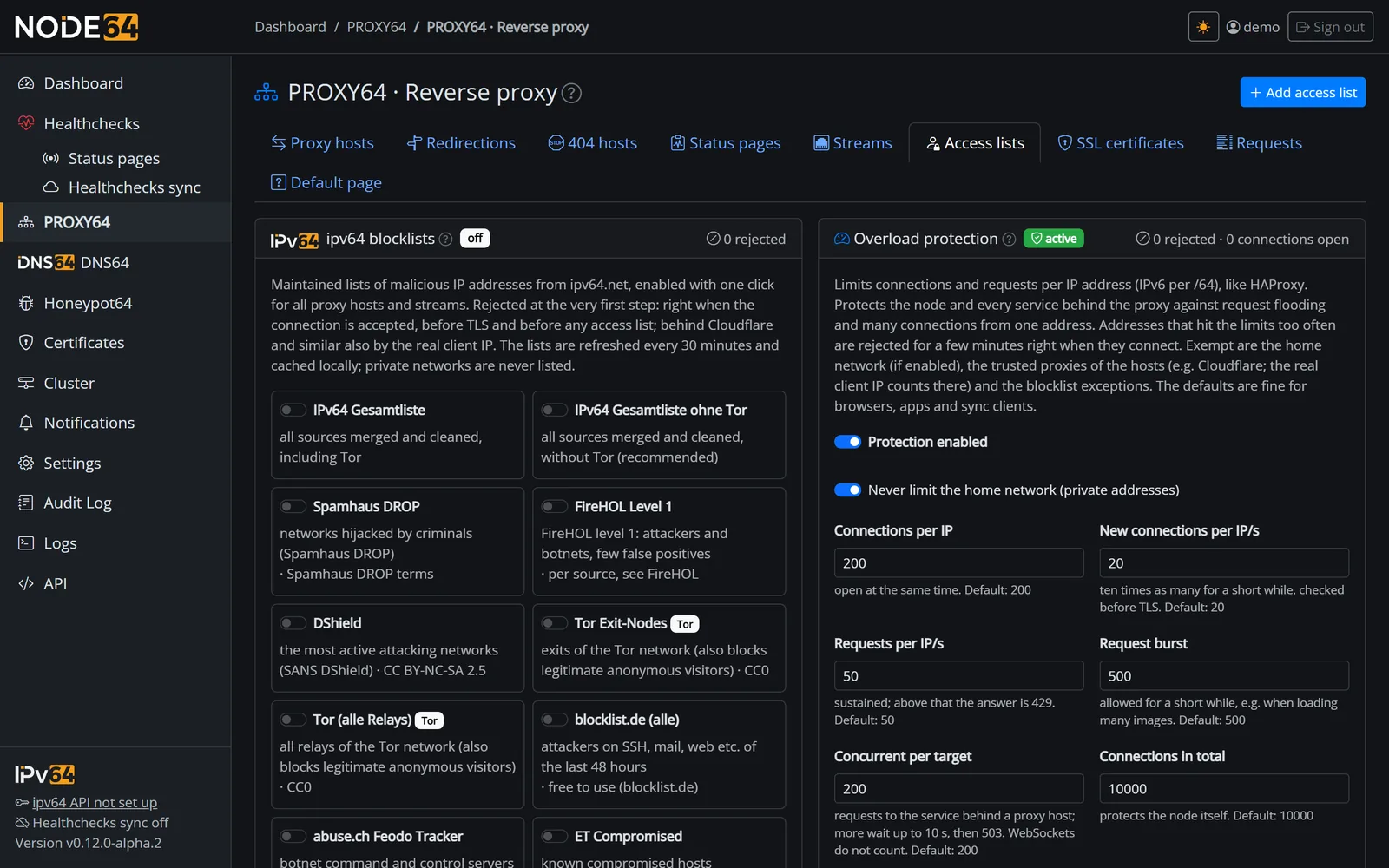
Under PROXY64 → Access lists you switch on lists of malicious IP addresses from ipv64.net – with one click for the whole reverse proxy. The selection comes straight from ipv64.net: new lists appear without a Node64 update, and each list shows its licence and description. Current selection:
| Group | Lists |
|---|---|
| Combined lists | Combined list without Tor (recommended) and combined list with Tor – merge the attacker, botnet and Tor lists |
| Attackers | Spamhaus DROP, FireHOL Level 1, DShield, blocklist.de, ET Compromised, CINS Army, IPsum Level 3 |
| Botnets | abuse.ch Feodo Tracker (command-and-control servers of Emotet, Dridex, QakBot and others) |
| Tor | Tor exit nodes, all Tor relays |
| ipv64 Honeypot | v64 Blocklist and sub-lists SSH, web, mail, RDP, scanners and research scanners – from the reports of Honeypot64 sensors; deliberately not part of the combined lists. |
| AI bots | v64 AI Bots (IP) – official networks of OpenAI, Perplexity, Common Crawl, Mistral and Google-Agent; without the search crawlers of Google, Bing and Apple (see Blocking AI bots) |
| Cloud networks | Amazon AWS, Google Cloud, Cloudflare – e.g. to keep scanners and bots from data centres away |
- Rejected early: blocking happens first – during connection setup, before TLS and before any access list. This applies to proxy hosts, passthrough hosts and streams. HTTP/3 gets a 403.
- Updated every 30 minutes. If ipv64.net can't be reached, the last state stays in effect.
- Exceptions: IPs or networks you add are never blocked.
- Behind a trusted proxy (e.g. Cloudflare), the real client IP is checked as well.
Live lists with a list token
The “ipv64 Honeypot” lists come in two editions: the daily edition (once a day, free for everyone) and the live edition (re-evaluated every 30 minutes). For the live edition, enter the list token from your ipv64 account (ipv64.net/honeypot/token.php) (32 characters, letters and digits) in the blocklist card under PROXY64 → Access lists.
- Each list shows which edition is loaded: live or daily.
- If the token has no permission, it says “daily edition – token without permission”. If ipv64 rejects the request, PROXY64 loads the daily edition and shows the error. So you are always protected.
- The token is stored encrypted and never shown, logged or exported. You change and delete it in the same card; without a token the lists come in the daily edition again.
- Via the API:
GET /api/cdn64/blocklistsreturnstoken_setand per listedition,live_deniedandlive_error;PUTtakestoken(empty = delete).
ipv64 decides who gets the live edition – more under v64 Blocklist and at ipv64.net/v64_blocklists.
Working with Honeypot64
If the Honeypot64 module runs on the same node, PROXY64 and the traps can work together. The Honeypot64 card under PROXY64 → Access lists (on the right below “Overload protection”) has three switches for this – all off by default and only effective while Honeypot64 is running – and below them the paths for requests recognised as malicious:
| Switch | Effect |
|---|---|
| Unknown requests to the honeypot | Requests without a matching host on ports 80 and 443 – IP only, foreign domain or unknown name – get the web bait instead of the default page. Unknown names use the fallback certificate. From then on the node answers unknown requests visibly (login page, fallback certificate) – even if the default page is set to “close connection”. |
| Pass accesses to the honeypot | For each request only metadata goes to the log sensor: client IP, host, whether it is known, method, path without query, status, TLS, failed access-list login and the user agent for classification. Never content. |
| Block attackers from the honeypot at once | IPs reported by the honeypot are blocked by PROXY64 immediately for all hosts and streams – without waiting for the v64 Blocklist. Duration 1 to 720 hours (default 24). |
- Never blocked: private addresses, CGNAT, the exceptions of the blocklists and the trusted proxies of the hosts.
- Block list: in memory only, at most 50,000 entries (when full, the one expiring first gives way), empty after a restart. The card shows each entry with reason and end; you can lift them one by one there or via the API. Switching off empties the list.
- Visible: rejected requests appear in statistics and the access log with the reason “reported by honeypot”.
- API:
GET/PUT /api/cdn64/honeypot,DELETE /api/cdn64/honeypot/blocks/{ip}. Prometheus:node64_cdn64_honeypot_blocks,…_blocks_total,…_rejected_total,…_decoy_total,…_reported_total(only when a switch is on).
Requests recognised as malicious to the decoy
In the block Also send requests recognised as malicious to the decoy on the same card, the decoy gets requests PROXY64 would otherwise reject, instead of a 403 – attackers notice nothing, the honeypot collects more. There is one switch per kind:
| Kind | Default |
|---|---|
| IPs on the ipv64 blocklists | on |
| attackers reported by the honeypot (instant block) | on |
| exploit patterns (“Block Common Exploits” on the host) | on |
| AI bots and scanners (blocked on the host) | on |
| country block (also hits real visitors) | off |
- Overload – too many requests or connections – never goes to the decoy; that is protection, not an attack.
- Only applies while the decoy is active (switch “Unknown requests to the honeypot” or Honeypot64 with the Only via PROXY64 template), and only for HTTP(S). TCP/UDP streams and “TLS passthrough” still reject.
- If Honeypot64 runs with the Only via PROXY64 template, the decoy is on automatically; the card shows a notice with a link to the template.
- If the path for blocklists or reported attackers is on, the web entry no longer cuts blocked IPs off before TLS – the request gets the decoy. Passed-through hosts check the blocks themselves after the first TLS packet.
- In the statistics, such requests count separately under To honeypot, not under “rejected”.
Blocking AI bots
Per host (Details tab) you keep AI crawlers and AI assistants away from your sites:
- Reject AI bots (user agent): requests whose user agent contains an identifier from the v64 AI Bots (User-Agent) list get a neutral
403. In statistics and the access log they appear with the reason “AI bot”. - Also block fetches on behalf of users (on by default): fetches a human triggers through an assistant too – such as ChatGPT-User, Perplexity-User, Claude-User or agents. Off = block crawlers only.
- Serve robots.txt that blocks AI bots (proxy hosts only): if the target has no
/robots.txtof its own, PROXY64 serves one withDisallow: /for all identifiers. Your own robots.txt stays untouched, and/robots.txtitself is never blocked. - Applies to proxy hosts, redirects and status pages.
- Additionally by IP: the blocklist v64 AI Bots (IP) blocks the official networks of AI crawlers right at connection setup, for all hosts – OpenAI (GPTBot, OAI-SearchBot, ChatGPT-User), Perplexity (PerplexityBot, Perplexity-User), Common Crawl (CCBot), MistralAI-User and Google-Agent, around 310 networks in total. Search engine crawlers from Google, Bing and Apple are deliberately not included.
The list: a daily mirror of ai.robots.txt on ipv64.net with around 190 identifiers – Node64 doesn't download anything from GitHub. Case doesn't matter; an identifier has to appear as a word of its own (“Spider” doesn't match “Baiduspider”). The list is only loaded while a host uses it, every 30 minutes and only when it changed; without a connection to ipv64.net the last version applies. Status and counters are shown on the blocklists card.
The list also contains Applebot (Siri, Spotlight) and facebookexternalhit (link previews) as well as generic identifiers such as “Code” and “Spider”, which can also hit other tools with that word in their user agent. If you need those, leave the block off for the affected host.
Country blocking
Per host – for proxy hosts, redirects and "TLS passthrough" – and per stream (TCP and UDP) you block visitors from certain countries or allow only certain countries. For hosts the setting is in the Details tab, for streams in the stream form below the TLS field. A change takes effect immediately without restarting the stream; for UDP the first packet of a client decides.
- Two modes: "block these countries" or "allow only these countries", countries as ISO codes (e.g.
DE,AT,CH). - Country lists from ipv64.net: updated daily; only the countries you actually use are loaded and cached.
- While loading: if the list of an allowed country is still missing – shortly after start or when the download fails –, “only allow these countries” blocks nobody instead of rejecting visitors from that country.
- Never blocked: private networks, CGNAT and the blocklist exceptions. Behind Cloudflare or similar, the real client IP counts.
- Visible: rejected visitors show up in the statistics and access log with the reason "country block".
In the API the host fields are advanced.geo_mode (empty, block or allow) and advanced.geo_countries (list of ISO codes); on a stream they are geo_mode and geo_countries. GET /api/cdn64/blocklists returns the available countries and the number of visitors rejected by country blocking.
Overload protection (rate limits)
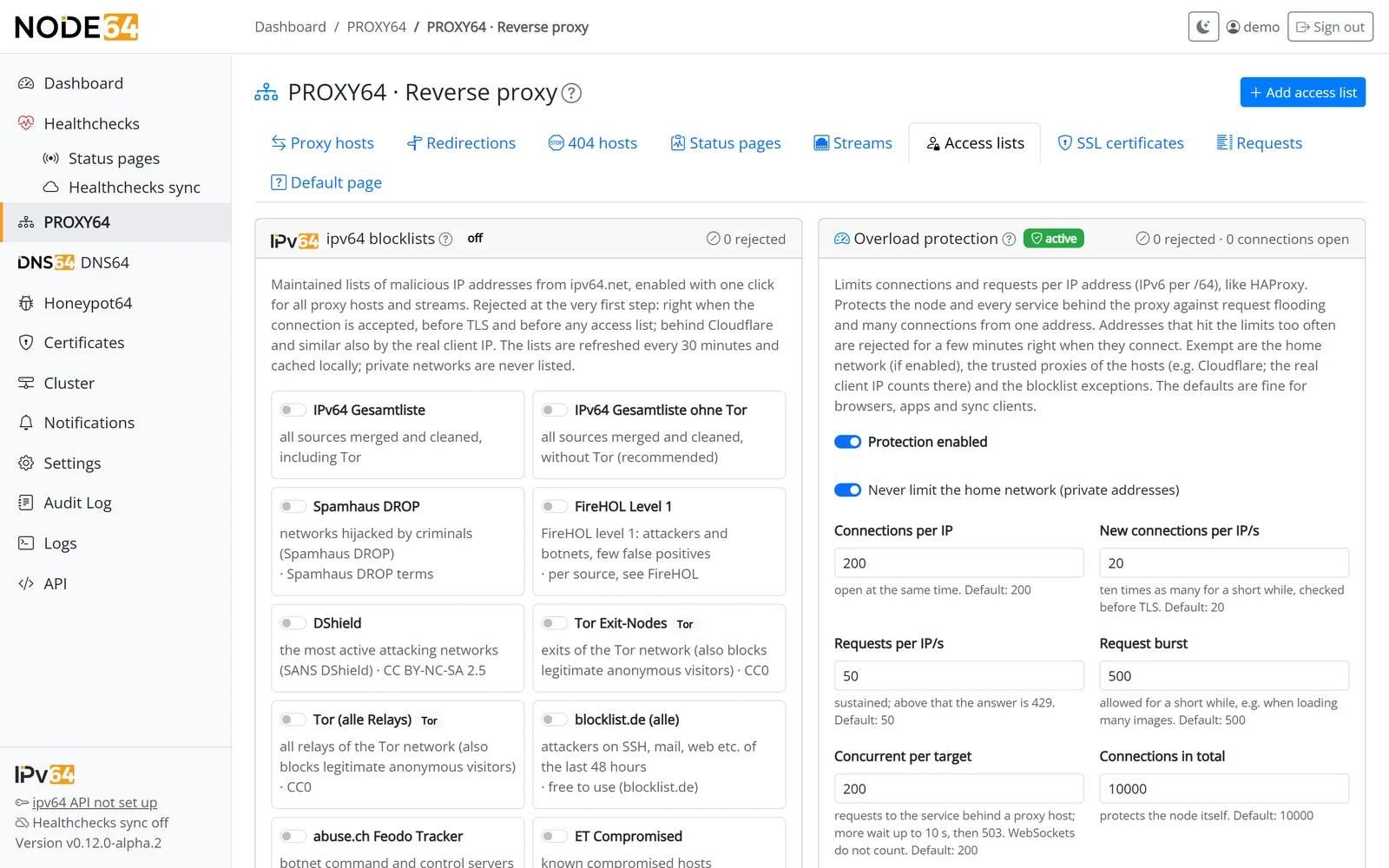
PROXY64 limits connections and requests much like stick tables and maxconn in HAProxy. The protection is on by default, with values that suit browsers, apps and sync clients. Counting is per IPv4 address or per IPv6 /64.
| Limit | Default | What happens above it |
|---|---|---|
| Connections per IP | 200 concurrent | further ones are dropped before TLS |
| New connections per IP | 20/s, bursts up to 200 | further ones are dropped before TLS |
| Requests per IP | 50/s, bursts up to 500 | response 429 with Retry-After |
| Concurrent per target | 200 per proxy host | requests wait up to 10 s, then 503; WebSockets don't count |
| Connections in total | 10,000 | protects the node itself |
| Ban | after 300 rejections within 1 minute | 10-minute ban, enforced at connection time |
- Exempt are your home network (private, loopback and link-local addresses; can be turned off), the trusted proxies of your hosts (the real client IP counts there) and the blocklist exceptions.
- Per host you'll find “No per-IP limits” under Advanced: the request limit and the per-target cap then no longer apply. Connection limits and bans remain.
- Setting a value to 0 turns that individual limit off.
- Applies to proxy hosts, redirects, 404 hosts, TLS passthrough (connections only) and TCP streams.
- Banned addresses are listed on the card and can be released there. Every ban is logged.
- In the host list a speedometer icon shows that the local limits apply to the host (a click opens the settings); a green shield means the host runs through CDN64 and is also protected on the edge servers – see overload protection on the servers.
Error pages
Neutral error pages (404, 403, 502, 508) reveal nothing about Node64 or your target. If a target is unreachable, visitors see a 502. If a target points back at the proxy itself, PROXY64 detects the loop and answers with 508.
Statistics and access log
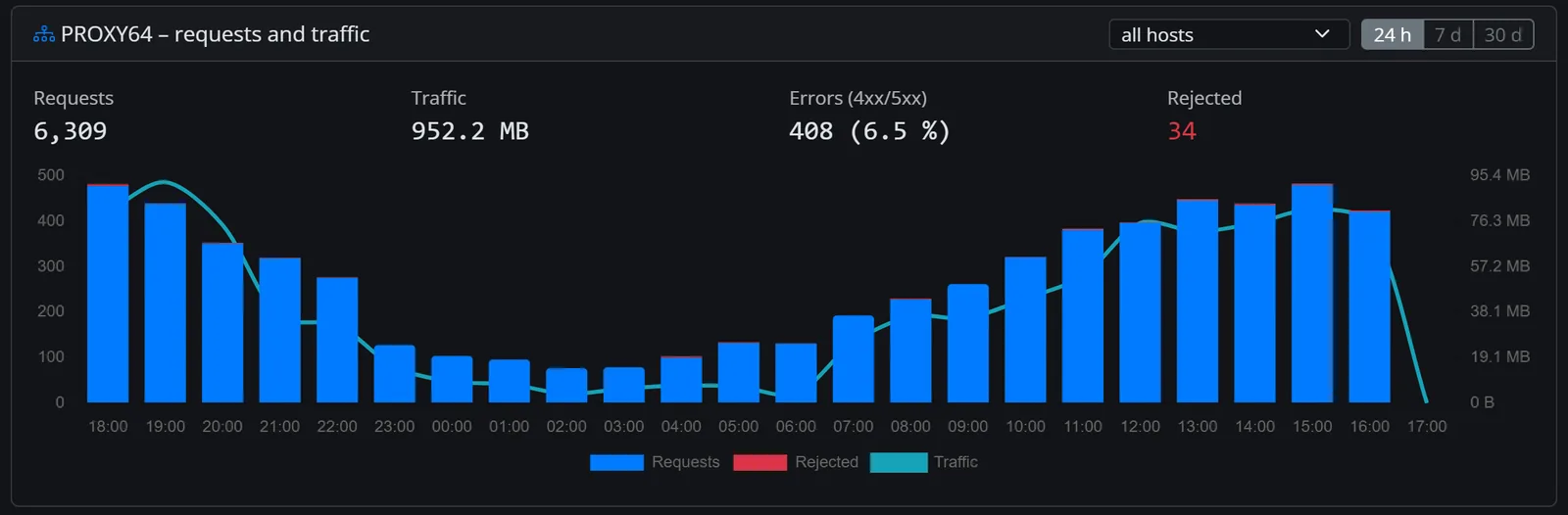
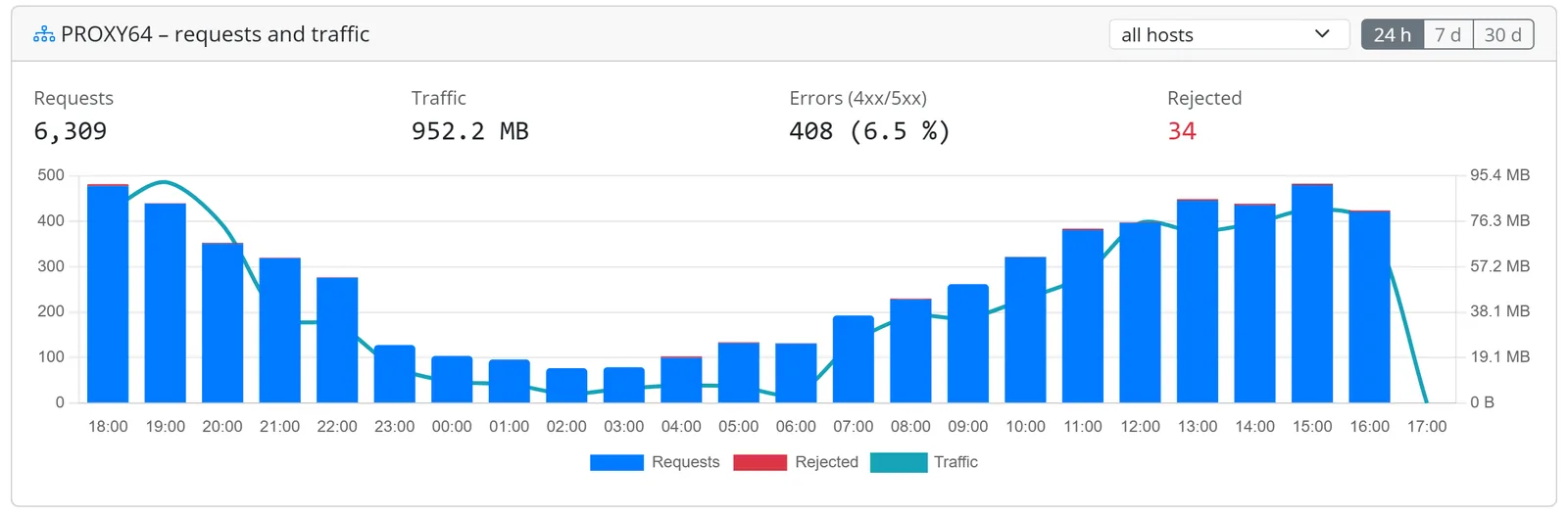
- Statistics: requests per host and hour – split into 2xx, 3xx, 4xx and 5xx, plus traffic and rejections – are kept for 90 days. The chart covers 24 hours, 7 or 30 days, for all hosts or one. “24 h” on the page, the card and in Prometheus means exactly the last 24 full hours; totals and chart count the same hours. The per-host figures in the table – requests, traffic, errors, 4xx, rejections and to honeypot – follow the time range switch of the traffic card; column headers and figures name the range.
- What counts where:
- Errors are only 5xx and “target unreachable”.
- 4xx from the target are shown separately in grey – such as missing icons in Bitwarden (404) or expired logins (401). That's usually not an error.
- Rejected are requests PROXY64 refuses itself; they only count there, no longer also under 4xx. Older hours (before PROXY64 1.29.0) still include rejections under 4xx.
- To honeypot are requests that got the decoy instead of a rejection – unknown names and those recognised as malicious. Per host in the table, as a key figure, in the chart and in the access log (marker “to honeypot” and its own filter). Visible while the decoy is active or if there were redirects in the period.
- Chart colours (on the dashboard too): requests blue, 4xx grey, errors (5xx) yellow, rejected red, to honeypot purple, traffic as a line.
- Dashboard card: requests, traffic, 5xx errors with their share, rejections (24 hours) and active TCP streams.
- Access log: can be enabled per host (Access tab), kept for 1–90 days, client IPs optionally shortened.
- Rejections are always recorded with a reason, even without the access log: blocklist, ban, limits, access list, exploit block and AI bot. Use the “Rejected” filter on the Access tab; requests to the decoy have their own “To honeypot” filter. The log gets at most one entry every 10 seconds per address, reason and host; every rejection is counted.
- Storage: statistics and access log live in
/data/cdn64/cdn64.db. They are only included in a backup if you choose to back up statistics as well (see Update & backup). - Audit: every change from the UI and the API is recorded in the audit log.
- Prometheus: requests, errors, rejections and target reachability are also available as metrics, see Prometheus.
Target reachability and health checks
- PROXY64 checks the targets of proxy hosts, passthrough hosts and TCP streams every minute: via TCP, and for HTTP additionally with
HEAD /. - The list shows the response time or “unreachable since …”.
- “Create health check for this target” moves the target into the Health checks module with one click – with notifications. The Health checks module needs to be running. The check is then called “PROXY64: <name>”; online checks created from CDN64 are called “CDN64: <name>”.
- If a health check already monitors exactly this target, the table shows it with its status: “Health check (local)” for checks on this node, otherwise “ipv64/other node”. That includes checks you created by hand.
Shared entry point with DNS64 (DoH)
A port can only be opened once per address. That's why 80 and 443 don't belong to any module but to the shared entry point in the Node64 core. It routes by name: by SNI for TLS, by the Host header for HTTP. Each name belongs to exactly one consumer.
                       Node64 – shared entry point (80/443)
                     ┌─────────────────────────────────────────┐
 Request ───────────►│ the name (SNI or Host header) decides   │
                     └──┬───────────┬────────────┬──────────┬──┘
                        ▼           ▼            ▼          ▼
                 ┌──────────┐ ┌───────────┐ ┌──────────┐ ┌──────────┐
                 │ PROXY64  │ │ DNS64     │ │ Let's    │ │ Node64   │
                 │ all host │ │ DoH at    │ │ Encrypt  │ │ UI       │
                 │ types    │ │ /dns-query│ │ HTTP-01  │ │          │
                 └──────────┘ └───────────┘ └──────────┘ └──────────┘
- PROXY64 and DNS-over-HTTPS share port 443 – no second container, no second IP. DoH at
/dns-queryis available from DNS64 1.8.0, see DNS64. - The Node64 UI can be reached under a name of its own via the entry point. By default only from your own network; “from the internet” has to be switched on explicitly.
- Ports are only open while a consumer needs them. If only DoH is in use, port 80 stays closed.
- DNS stays in your LAN: DoH only answers clients on DNS64's allow list. It always looks at the real peer, never at a header. Everyone else gets a neutral 404. Never forward ports 53 or 853 on your router.
- You only need a second container or IP if another program on the same host wants port 443, such as an old NPM.
Certificates
PROXY64 takes its certificates from the central certificate store. In short:
| Method | When | Open port? |
|---|---|---|
| ipv64 DNS-01 | domain is in your ipv64 account, wildcards too | no |
| Alias via ipv64 | external domain, one CNAME for _acme-challenge | no |
| Other DNS provider | 26 providers with stored DNS credentials | no |
| HTTP-01 | any domain pointing to your connection | port 80 |
| Your own certificate | upload as PEM or .pfx/.p12 | – |
Renewal happens automatically 30 days before expiry – even while PROXY64 is switched off.
In the host form (SSL tab) you can create one right away with Request a new certificate right away. How to get the certificate offers the same ways as certificate management: Automatic, ipv64 DNS-01, HTTP-01, another DNS provider per stored credential, your own CA per CA, and self-signed. Whatever isn't possible right now is greyed out with a reason – such as ipv64 DNS-01 without an API key or a DNS provider without credentials. Alias via ipv64 needs the CNAME first and therefore only works under Certificates → New. For the Let's Encrypt ways, tick the terms of service box, otherwise the host isn't saved; your own CA and self-signed need no account.
Moving from Nginx Proxy Manager
| Nginx Proxy Manager | PROXY64 |
|---|---|
| Proxy Hosts (Details, Custom Locations, SSL) | Proxy hosts with the tabs Details, Locations, SSL, Advanced |
| Advanced (nginx config) | Advanced: headers, host header, timeout, upload limit, buffering, compression, trusted proxies |
| Redirection Hosts / Streams / 404 Hosts | Redirects / Streams / 404 hosts |
| Access Lists | Access lists |
| SSL Certificates | Certificates in the core (ipv64, alias, DNS providers, HTTP-01, upload, own CA) |
| Default Site | Default page |
| – | TLS passthrough, HTTP/3, rate limits, ipv64 blocklists, target reachability, create health check, DNS record at ipv64, CDN64 |
There's deliberately no import from NPM. You create the hosts again, and Node64 fetches fresh certificates. Tip: if NPM runs on a different host or IP, keep it running until all hosts are in PROXY64, then switch the port forwarding on your router.
API
Everything in the UI is also available through the local API with an API key, for example /api/cdn64/hosts, /api/cdn64/streams, /api/cdn64/access-lists, /api/cdn64/blocklists, /api/cdn64/limits and /api/cdn64/stats. The node serves the full description at /api/openapi.json. A status page host has "kind": "status" and the status_page_id.
Limitations
- No free-form nginx configuration – the fixed fields under “Advanced” cover the common cases instead.
- No load balancing across multiple targets in your network (a proxy host has exactly one target). The load balancing of CDN64 across the two edge servers is separate from this.
- No per-host rate limits. Countries are blocked per host via country blocking.
- No import from Nginx Proxy Manager.
- TLS passthrough works over TCP only, not over HTTP/3.
- Reachability and “since start” counters live in memory only and reset after a restart. The statistics in
cdn64.dbare kept.
Questions or ideas? Check the FAQ or drop by ipv64.net.
Something unclear, missing, or a question about Node64? Ask in the official forum v64.tech.

